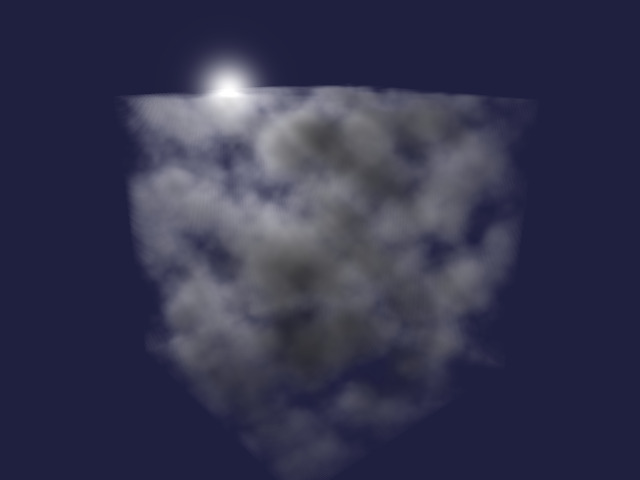
Volumetric Clouds with Clojure and LWJGL

Procedural generation of volumetric clouds using different types of noise

(Cross posting article published at Clojure Civitas)

Dependencies

To download the required libraries, we use a deps.edn file with the following content:

{:deps
 {
  org.clojure/clojure {:mvn/version "1.12.3"}
  org.scicloj/noj     {:mvn/version "2-beta18"}
  midje/midje         {:mvn/version "1.10.10"}
  generateme/fastmath {:mvn/version "3.0.0-alpha4"}
  comb/comb           {:mvn/version "1.0.0"}
  }
}

We are going to import the following methods and namespaces:

(require '[clojure.math :refer (PI sqrt cos sin tan to-radians pow floor)]
         '[midje.sweet :refer (fact facts tabular => roughly)]
         '[fastmath.vector :refer (vec2 vec3 add mult sub div mag dot normalize)]
         '[fastmath.matrix :refer (mat->float-array mulm
                                   rotation-matrix-3d-x rotation-matrix-3d-y)]
         '[tech.v3.datatype :as dtype]
         '[tech.v3.tensor :as tensor]
         '[tech.v3.datatype.functional :as dfn]
         '[tablecloth.api :as tc]
         '[scicloj.tableplot.v1.plotly :as plotly]
         '[tech.v3.libs.buffered-image :as bufimg]
         '[comb.template :as template])
(import '[org.lwjgl.opengl GL11]
        '[org.lwjgl BufferUtils]
        '[org.lwjgl.glfw GLFW]
        '[org.lwjgl.opengl GL GL11 GL12 GL13 GL15 GL20 GL30 GL32 GL42])

Worley noise

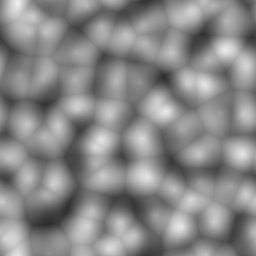
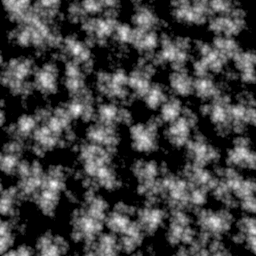
Worley noise is a type of structured noise which is defined for each pixel using the distance to the nearest seed point.

Noise parameters

First we define a function to create parameters of the noise.

  • size is the size of each dimension of the noise array
  • divisions is the number of subdividing cells in each dimension
  • dimensions is the number of dimensions
(defn make-noise-params
  [size divisions dimensions]
  {:size size :divisions divisions :cellsize (/ size divisions) :dimensions dimensions})

Here is a corresponding Midje test. Note that ideally you practise Test Driven Development (TDD), i.e. you start with writing one failing test. Because this is a Clojure notebook, the unit tests are displayed after the implementation.

(fact "Noise parameter initialisation"
      (make-noise-params 256 8 2) => {:size 256 :divisions 8 :cellsize 32 :dimensions 2})

2D and 3D vectors

Next we need a function which allows us to create 2D or 3D vectors depending on the number of input parameters.

(defn vec-n
  ([x y] (vec2 x y))
  ([x y z] (vec3 x y z)))

(facts "Generic vector function for creating 2D and 3D vectors"
       (vec-n 2 3) => (vec2 2 3)
       (vec-n 2 3 1) => (vec3 2 3 1))

Random points

The following method generates a random point in a cell specified by the cell indices.

(defn random-point-in-cell
  [{:keys [cellsize]} & indices]
  (let [random-seq (repeatedly #(rand cellsize))
        dimensions (count indices)]
    (add (mult (apply vec-n (reverse indices)) cellsize)
         (apply vec-n (take dimensions random-seq)))))

We test the method by replacing the random function with a deterministic function.

(facts "Place random point in a cell"
       (with-redefs [rand (fn [s] (* 0.5 s))]
         (random-point-in-cell {:cellsize 1} 0 0) => (vec2 0.5 0.5)
         (random-point-in-cell {:cellsize 2} 0 0) => (vec2 1.0 1.0)
         (random-point-in-cell {:cellsize 2} 0 3) => (vec2 7.0 1.0)
         (random-point-in-cell {:cellsize 2} 2 0) => (vec2 1.0 5.0)
         (random-point-in-cell {:cellsize 2} 2 3 5) => (vec3 11.0 7.0 5.0)))

We can now use the random-point method to generate a grid of random points. The grid is represented using a tensor from the dtype-next library.

(defn random-points
  [{:keys [divisions dimensions] :as params}]
  (tensor/clone
    (tensor/compute-tensor (repeat dimensions divisions)
                           (partial random-point-in-cell params))))
(facts "Greate grid of random points"
       (let [params-2d (make-noise-params 32 8 2)
             params-3d (make-noise-params 32 8 3)]
         (with-redefs [rand (fn [s] (* 0.5 s))]
           (dtype/shape (random-points params-2d)) => [8 8]
           ((random-points params-2d) 0 0) => (vec2 2.0 2.0)
           ((random-points params-2d) 0 3) => (vec2 14.0 2.0)
           ((random-points params-2d) 2 0) => (vec2 2.0 10.0)
           (dtype/shape (random-points params-3d)) => [8 8 8]
           ((random-points params-3d) 2 3 5) => (vec3 22.0 14.0 10.0))))

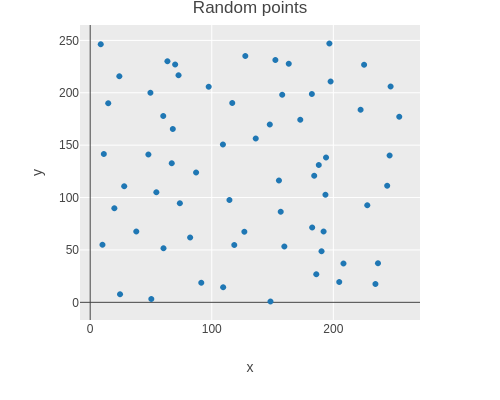
Here is a scatter plot showing one random point placed in each cell.

(let [points  (tensor/reshape (random-points (make-noise-params 256 8 2)) [(* 8 8)])
      scatter (tc/dataset {:x (map first points) :y (map second points)})]
  (-> scatter
      (plotly/base {:=title "Random points"})
      (plotly/layer-point {:=x :x :=y :y})))

random points

Modular distance

In order to get a periodic noise array, we need to component-wise wrap around distance vectors.

(defn mod-vec
  [{:keys [size]} v]
  (let [size2 (/ size 2)
        wrap  (fn [x] (-> x (+ size2) (mod size) (- size2)))]
    (apply vec-n (map wrap v))))
(facts "Wrap around components of vector to be within -size/2..size/2"
       (mod-vec {:size 8} (vec2 2 3)) => (vec2 2 3)
       (mod-vec {:size 8} (vec2 5 2)) => (vec2 -3 2)
       (mod-vec {:size 8} (vec2 2 5)) => (vec2 2 -3)
       (mod-vec {:size 8} (vec2 -5 2)) => (vec2 3 2)
       (mod-vec {:size 8} (vec2 2 -5)) => (vec2 2 3)
       (mod-vec {:size 8} (vec3 2 3 1)) => (vec3 2 3 1)
       (mod-vec {:size 8} (vec3 5 2 1)) => (vec3 -3 2 1)
       (mod-vec {:size 8} (vec3 2 5 1)) => (vec3 2 -3 1)
       (mod-vec {:size 8} (vec3 2 3 5)) => (vec3 2 3 -3)
       (mod-vec {:size 8} (vec3 -5 2 1)) => (vec3 3 2 1)
       (mod-vec {:size 8} (vec3 2 -5 1)) => (vec3 2 3 1)
       (mod-vec {:size 8} (vec3 2 3 -5)) => (vec3 2 3 3))

Using the mod-dist function we can calculate the distance between two points in the periodic noise array.

(defn mod-dist
  [params a b]
  (mag (mod-vec params (sub b a))))

The tabular macro implemented by Midje is useful for running parametrized tests.

(tabular "Wrapped distance of two points"
         (fact (mod-dist {:size 8} (vec2 ?ax ?ay) (vec2 ?bx ?by)) => ?result)
         ?ax ?ay ?bx ?by ?result
         0   0   0   0   0.0
         0   0   2   0   2.0
         0   0   5   0   3.0
         0   0   0   2   2.0
         0   0   0   5   3.0
         2   0   0   0   2.0
         5   0   0   0   3.0
         0   2   0   0   2.0
         0   5   0   0   3.0)

Modular lookup

We also need to lookup elements with wrap around. We recursively use tensor/select and then finally the tensor as a function to lookup along each axis.

(defn wrap-get
  [t & args]
  (if (> (count (dtype/shape t)) (count args))
    (apply tensor/select t (map mod args (dtype/shape t)))
    (apply t (map mod args (dtype/shape t)))))

A tensor with index vectors is used to test the lookup.

(facts "Wrapped lookup of tensor values"
       (let [t (tensor/compute-tensor [4 6] vec2)]
         (wrap-get t 2 3) => (vec2 2 3)
         (wrap-get t 2 7) => (vec2 2 1)
         (wrap-get t 5 3) => (vec2 1 3)
         (wrap-get (wrap-get t 5) 3) => (vec2 1 3)))

The following function converts a noise coordinate to the index of a cell in the random point array.

(defn division-index
  [{:keys [cellsize]} x]
  (int (floor (/ x cellsize))))
(facts "Convert coordinate to division index"
       (division-index {:cellsize 4} 3.5)  => 0
       (division-index {:cellsize 4} 7.5)  => 1
       (division-index {:cellsize 4} -0.5) => -1)

Getting indices of Neighbours

The following function determines the neighbouring indices of a cell recursing over each dimension.

(defn neighbours
  [& args]
  (if (seq args)
    (mapcat (fn [v] (map (fn [delta] (into [(+ (first args) delta)] v)) [-1 0 1]))
            (apply neighbours (rest args)) )
    [[]]))
(facts "Get neighbouring indices"
       (neighbours) => [[]]
       (neighbours 0) => [[-1] [0] [1]]
       (neighbours 3) => [[2] [3] [4]]
       (neighbours 1 10) => [[0 9] [1 9] [2 9] [0 10] [1 10] [2 10] [0 11] [1 11] [2 11]])

Sampling Worley noise

Using above functions one can now implement Worley noise. For each pixel the distance to the closest seed point is calculated. This is achieved by determining the distance to each random point in all neighbouring cells and then taking the minimum.

(defn worley-noise
  [{:keys [size dimensions] :as params}]
  (let [random-points (random-points params)]
    (tensor/clone
      (tensor/compute-tensor
        (repeat dimensions size)
        (fn [& coords]
            (let [center   (map #(+ % 0.5) coords)
                  division (map (partial division-index params) center)]
              (apply min
                     (for [neighbour (apply neighbours division)]
                          (mod-dist params (apply vec-n (reverse center))
                                    (apply wrap-get random-points neighbour))))))
        :double))))

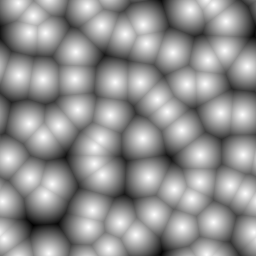
Here a 256 × 256 Worley noise tensor is created.

(def worley (worley-noise (make-noise-params 256 8 2)))

The values are inverted and normalised to be between 0 and 255.

(def worley-norm
  (dfn/* (/ 255 (- (dfn/reduce-max worley) (dfn/reduce-min worley)))
         (dfn/- (dfn/reduce-max worley) worley)))

Finally one can display the noise.

(bufimg/tensor->image worley-norm)

Worley noise

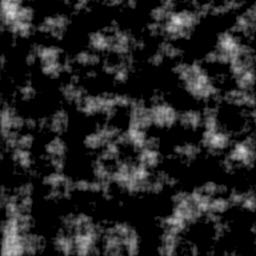
Perlin noise

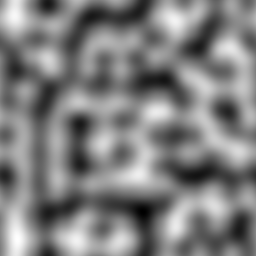
Perlin noise is generated by choosing a random gradient vector at each cell corner. The noise tensor’s intermediate values are interpolated with a continuous function, utilizing the gradient at the corner points.

Random gradients

The 2D or 3D gradients are generated by creating a vector where each component is set to a random number between -1 and 1. Random vectors are generated until the vector length is greater 0 and lower or equal to 1. The vector then is normalized and returned. Random vectors outside the unit circle or sphere are discarded in order to achieve a uniform distribution on the surface of the unit circle or sphere.

(defn random-gradient
  [& args]
  (loop [args args]
        (let [random-vector (apply vec-n (map (fn [_x] (- (rand 2.0) 1.0)) args))
              vector-length (mag random-vector)]
          (if (and (> vector-length 0.0) (<= vector-length 1.0))
            (div random-vector vector-length)
            (recur args)))))

The function below serves as a Midje checker for a vector with an approximate expected value.

(defn roughly-vec
  [expected error]
  (fn [actual]
      (<= (mag (sub actual expected)) error)))

In the following tests, the random function is again replaced with a deterministic function.

(facts "Create unit vector with random direction"
       (with-redefs [rand (constantly 0.5)]
         (random-gradient 0 0)
         => (roughly-vec (vec2 (- (sqrt 0.5)) (- (sqrt 0.5))) 1e-6))
       (with-redefs [rand (constantly 1.5)]
         (random-gradient 0 0)
         => (roughly-vec (vec2 (sqrt 0.5) (sqrt 0.5)) 1e-6)))

The random gradient function is then used to generate a field of random gradients.

(defn random-gradients
 [{:keys [divisions dimensions]}]
 (tensor/clone (tensor/compute-tensor (repeat dimensions divisions) random-gradient)))

The function is verified to correctly generate 2D and 3D random gradient fields.

(facts "Random gradients"
       (with-redefs [rand (constantly 1.5)]
         (dtype/shape (random-gradients {:divisions 8 :dimensions 2}))
         => [8 8]
         ((random-gradients {:divisions 8 :dimensions 2}) 0 0)
         => (roughly-vec (vec2 (sqrt 0.5) (sqrt 0.5)) 1e-6)
         (dtype/shape (random-gradients {:divisions 8 :dimensions 3})) => [8 8 8]
         ((random-gradients {:divisions 8 :dimensions 3}) 0 0 0)
         => (vec3 (/ 1 (sqrt 3)) (/ 1 (sqrt 3)) (/ 1 (sqrt 3)))))

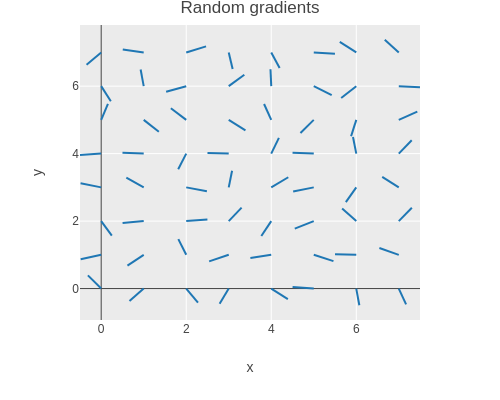
The gradient field can be plotted with Plotly as a scatter plot of disconnected lines.

(let [gradients (tensor/reshape (random-gradients (make-noise-params 256 8 2))
                                [(* 8 8)])
      points    (tensor/reshape (tensor/compute-tensor [8 8] (fn [y x] (vec2 x y)))
                                [(* 8 8)])
      scatter   (tc/dataset {:x (mapcat (fn [point gradient]
                                            [(point 0)
                                             (+ (point 0) (* 0.5 (gradient 0)))
                                             nil])
                                        points gradients)
                             :y (mapcat (fn [point gradient]
                                            [(point 1)
                                             (+ (point 1) (* 0.5 (gradient 1)))
                                             nil])
                                        points gradients)})]
  (-> scatter
      (plotly/base {:=title "Random gradients" :=mode "lines"})
      (plotly/layer-point {:=x :x :=y :y})))

Random gradients

Corner vectors

The next step is to determine the vectors to the corners of the cell for a given point. First we define a function to determine the fractional part of a number.

(defn frac
  [x]
  (- x (Math/floor x)))

(facts "Fractional part of floating point number"
       (frac 0.25) => 0.25
       (frac 1.75) => 0.75
       (frac -0.25) => 0.75)

This function can be used to determine the relative position of a point in a cell.

(defn cell-pos
  [{:keys [cellsize]} point]
  (apply vec-n (map frac (div point cellsize))))

(facts "Relative position of point in a cell"
       (cell-pos {:cellsize 4} (vec2 2 3)) => (vec2 0.5 0.75)
       (cell-pos {:cellsize 4} (vec2 7 5)) => (vec2 0.75 0.25)
       (cell-pos {:cellsize 4} (vec3 7 5 2)) => (vec3 0.75 0.25 0.5))

A 2 × 2 tensor of corner vectors can be computed by subtracting the corner coordinates from the point coordinates.

(defn corner-vectors
  [{:keys [dimensions] :as params} point]
  (let [cell-pos (cell-pos params point)]
    (tensor/compute-tensor
      (repeat dimensions 2)
      (fn [& args] (sub cell-pos (apply vec-n (reverse args)))))))
(facts "Compute relative vectors from cell corners to point in cell"
       (let [corners2 (corner-vectors {:cellsize 4 :dimensions 2} (vec2 7 6))
             corners3 (corner-vectors {:cellsize 4 :dimensions 3} (vec3 7 6 5))]
         (corners2 0 0) => (vec2 0.75 0.5)
         (corners2 0 1) => (vec2 -0.25 0.5)
         (corners2 1 0) => (vec2 0.75 -0.5)
         (corners2 1 1) => (vec2 -0.25 -0.5)
         (corners3 0 0 0) => (vec3 0.75 0.5 0.25)))

Extract gradients of cell corners

The function below retrieves the gradient values at a cell’s corners, utilizing wrap-get for modular access. The result is a 2 × 2 tensor of gradient vectors.

(defn corner-gradients
  [{:keys [dimensions] :as params} gradients point]
  (let [division (map (partial division-index params) point)]
    (tensor/compute-tensor
      (repeat dimensions 2)
      (fn [& coords] (apply wrap-get gradients (map + (reverse division) coords))))))
(facts "Get 2x2 tensor of gradients from a larger tensor using wrap around"
       (let [gradients2 (tensor/compute-tensor [4 6] (fn [y x] (vec2 x y)))
             gradients3 (tensor/compute-tensor [4 6 8] (fn [z y x] (vec3 x y z))) ]
         ((corner-gradients {:cellsize 4 :dimensions 2} gradients2 (vec2 9 6)) 0 0)
         => (vec2 2 1)
         ((corner-gradients {:cellsize 4 :dimensions 2} gradients2 (vec2 9 6)) 0 1)
         => (vec2 3 1)
         ((corner-gradients {:cellsize 4 :dimensions 2} gradients2 (vec2 9 6)) 1 0)
         => (vec2 2 2)
         ((corner-gradients {:cellsize 4 :dimensions 2} gradients2 (vec2 9 6)) 1 1)
         => (vec2 3 2)
         ((corner-gradients {:cellsize 4 :dimensions 2} gradients2 (vec2 23 15)) 1 1)
         => (vec2 0 0)
         ((corner-gradients {:cellsize 4 :dimensions 3} gradients3 (vec3 9 6 3)) 0 0 0)
         => (vec3 2 1 0)))

Influence values

The influence value is the function value of the function with the selected random gradient at a corner.

(defn influence-values
  [gradients vectors]
  (tensor/compute-tensor
    (repeat (count (dtype/shape gradients)) 2)
    (fn [& args] (dot (apply gradients args) (apply vectors args)))
    :double))
(facts "Compute influence values from corner vectors and gradients"
       (let [gradients2 (tensor/compute-tensor [2 2] (fn [_y x] (vec2 x 10)))
             vectors2   (tensor/compute-tensor [2 2] (fn [y _x] (vec2 1 y)))
             influence2 (influence-values gradients2 vectors2)
             gradients3 (tensor/compute-tensor [2 2 2] (fn [z y x] (vec3 x y z)))
             vectors3   (tensor/compute-tensor [2 2 2] (fn [_z _y _x] (vec3 1 10 100)))
             influence3 (influence-values gradients3 vectors3)]
         (influence2 0 0) => 0.0
         (influence2 0 1) => 1.0
         (influence2 1 0) => 10.0
         (influence2 1 1) => 11.0
         (influence3 1 1 1) => 111.0))

Interpolating the influence values

For interpolation the following “ease curve” is used.

(defn ease-curve
  [t]
  (-> t (* 6.0) (- 15.0) (* t) (+ 10.0) (* t t t)))
(facts "Monotonously increasing function with zero derivative at zero and one"
       (ease-curve 0.0) => 0.0
       (ease-curve 0.25) => (roughly 0.103516 1e-6)
       (ease-curve 0.5) => 0.5
       (ease-curve 0.75) => (roughly 0.896484 1e-6)
       (ease-curve 1.0) => 1.0)

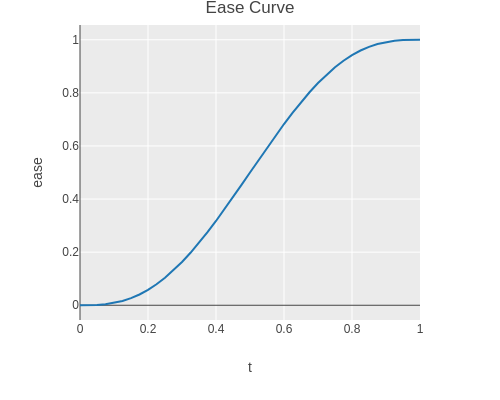
The ease curve monotonously increases in the interval from zero to one.

(-> (tc/dataset {:t (range 0.0 1.025 0.025)
                 :ease (map ease-curve (range 0.0 1.025 0.025))})
    (plotly/base {:=title "Ease Curve"})
    (plotly/layer-line {:=x :t :=y :ease}))

Ease curve

The interpolation weights are recursively calculated from the ease curve and the coordinate distances of the point to upper and lower cell boundary.

(defn interpolation-weights
  ([params point]
   (interpolation-weights (cell-pos params point)))
  ([pos]
   (if (seq pos)
     (let [w1   (- 1.0 (last pos))
           w2   (last pos)
           elem (interpolation-weights (butlast pos))]
       (tensor/->tensor [(dfn/* (ease-curve w1) elem) (dfn/* (ease-curve w2) elem)]))
     1.0)))
(facts "Interpolation weights"
       (let [weights2 (interpolation-weights {:cellsize 8} (vec2 2 7))
             weights3 (interpolation-weights {:cellsize 8} (vec3 2 7 3))]
         (weights2 0 0) => (roughly 0.014391 1e-6)
         (weights2 0 1) => (roughly 0.001662 1e-6)
         (weights2 1 0) => (roughly 0.882094 1e-6)
         (weights2 1 1) => (roughly 0.101854 1e-6)
         (weights3 0 0 0) => (roughly 0.010430 1e-6)))

Sampling Perlin noise

A Perlin noise sample is computed by

  • Getting the random gradients for the cell corners.
  • Getting the corner vectors for the cell corners.
  • Computing the influence values which have the desired gradients.
  • Determining the interpolation weights.
  • Computing the weighted sum of the influence values.
(defn perlin-sample
  [params gradients point]
  (let [gradients (corner-gradients params gradients point)
        vectors   (corner-vectors params point)
        influence (influence-values gradients vectors)
        weights   (interpolation-weights params point)]
    (dfn/reduce-+ (dfn/* weights influence))))

Now one can sample the Perlin noise by performing above computation for the center of each pixel.

(defn perlin-noise
  [{:keys [size dimensions] :as params}]
  (let [gradients (random-gradients params)]
    (tensor/clone
      (tensor/compute-tensor
        (repeat dimensions size)
        (fn [& args]
            (let [center (apply vec-n (map #(+ % 0.5) (reverse args)))]
              (perlin-sample params gradients center)))
        :double))))

Here a 256 × 256 Perlin noise tensor is created.

(def perlin (perlin-noise (make-noise-params 256 8 2)))

The values are normalised to be between 0 and 255.

(def perlin-norm
  (dfn/* (/ 255 (- (dfn/reduce-max perlin) (dfn/reduce-min perlin)))
         (dfn/- perlin (dfn/reduce-min perlin))))

Finally one can display the noise.

(bufimg/tensor->image perlin-norm)

Perlin noise

Mixing noise values

Combination of Worley and Perlin noise

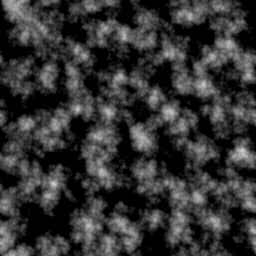
You can blend Worley and Perlin noise by performing a linear combination of both.

(def perlin-worley-norm (dfn/+ (dfn/* 0.3 perlin-norm) (dfn/* 0.7 worley-norm)))

Here for example is the average of Perlin and Worley noise.

(bufimg/tensor->image (dfn/+ (dfn/* 0.5 perlin-norm) (dfn/* 0.5 worley-norm)))

Worley and Perlin noise

Interpolation

One can linearly interpolate tensor values by recursing over the dimensions as follows.

(defn interpolate
  [tensor & args]
  (if (seq args)
    (let [x  (first args)
          xc (- x 0.5)
          xf (frac xc)
          x0 (int (Math/floor xc))]
      (+ (* (- 1.0 xf) (apply interpolate (wrap-get tensor      x0 ) (rest args)))
         (*        xf  (apply interpolate (wrap-get tensor (inc x0)) (rest args)))))
    tensor))

Here x-, y-, and z-ramps are used to test that interpolation works.

(facts "Interpolate values of tensor"
       (let [x2 (tensor/compute-tensor [4 6] (fn [_y x] x))
             y2 (tensor/compute-tensor [4 6] (fn [y _x] y))
             x3 (tensor/compute-tensor [4 6 8] (fn [_z _y x] x))
             y3 (tensor/compute-tensor [4 6 8] (fn [_z y _x] y))
             z3 (tensor/compute-tensor [4 6 8] (fn [z _y _x] z))]
         (interpolate x2 2.5 3.5) => 3.0
         (interpolate y2 2.5 3.5) => 2.0
         (interpolate x2 2.5 4.0) => 3.5
         (interpolate y2 3.0 3.5) => 2.5
         (interpolate x2 0.0 0.0) => 2.5
         (interpolate y2 0.0 0.0) => 1.5
         (interpolate x3 2.5 3.5 5.5) => 5.0
         (interpolate y3 2.5 3.5 3.0) => 3.0
         (interpolate z3 2.5 3.5 5.5) => 2.0))

Octaves of noise

Fractal Brownian Motion is implemented by computing a weighted sum of the same base noise function using different frequencies.

(defn fractal-brownian-motion
  [base octaves & args]
  (let [scales (take (count octaves) (iterate #(* 2 %) 1))]
    (reduce + 0.0
            (map (fn [amplitude scale] (* amplitude (apply base (map #(* scale %) args))))
                 octaves scales))))

Here the Fractal Brownian Motion is tested using an alternating 1D function and later a 2D checkboard function.

(facts "Fractal Brownian motion"
       (let [base1 (fn [x] (if (>= (mod x 2.0) 1.0) 1.0 0.0))
             base2 (fn [y x] (if (= (Math/round (mod y 2.0)) (Math/round (mod x 2.0)))
                               0.0 1.0))]
         (fractal-brownian-motion base2 [1.0] 0 0) => 0.0
         (fractal-brownian-motion base2 [1.0] 0 1) => 1.0
         (fractal-brownian-motion base2 [1.0] 1 0) => 1.0
         (fractal-brownian-motion base2 [1.0] 1 1) => 0.0
         (fractal-brownian-motion base2 [0.5] 0 1) => 0.5
         (fractal-brownian-motion base2 [] 0 1) => 0.0
         (fractal-brownian-motion base2 [0.0 1.0] 0 0) => 0.0
         (fractal-brownian-motion base2 [0.0 1.0] 0.0 0.5) => 1.0
         (fractal-brownian-motion base2 [0.0 1.0] 0.5 0.0) => 1.0
         (fractal-brownian-motion base2 [0.0 1.0] 0.5 0.5) => 0.0
         (fractal-brownian-motion base1 [1.0] 0) => 0.0
         (fractal-brownian-motion base1 [1.0] 1) => 1.0
         (fractal-brownian-motion base1 [0.0 1.0] 0.0) => 0.0
         (fractal-brownian-motion base1 [0.0 1.0] 0.5) => 1.0))

Remapping and clamping

The remap function is used to map a range of values of an input tensor to a different range.

(defn remap
  [value low1 high1 low2 high2]
  (dfn/+ low2 (dfn/* (dfn/- value low1) (/ (- high2 low2) (- high1 low1)))))
(tabular "Remap values of tensor"
       (fact ((remap (tensor/->tensor [?value]) ?low1 ?high1 ?low2 ?high2) 0)
             => ?expected)
       ?value ?low1 ?high1 ?low2 ?high2 ?expected
       0      0     1      0     1      0
       1      0     1      0     1      1
       0      0     1      2     3      2
       1      0     1      2     3      3
       2      2     3      0     1      0
       3      2     3      0     1      1
       1      0     2      0     4      2)

The clamp function is used to element-wise clamp values to a range.

(defn clamp
  [value low high]
  (dfn/max low (dfn/min value high)))
(tabular "Clamp values of tensor"
       (fact ((clamp (tensor/->tensor [?value]) ?low ?high) 0) => ?expected)
       ?value ?low ?high ?expected
       2      2    3      2
       3      2    3      3
       0      2    3      2
       4      2    3      3)

Generating octaves of noise

The octaves function is used to create a series of decreasing weights and normalize them so that they add up to 1.

(defn octaves
  [n decay]
  (let [series (take n (iterate #(* % decay) 1.0))
        sum    (apply + series)]
    (mapv #(/ % sum) series)))

Here is an example of noise weights decreasing by 50% at each octave.

(octaves 4 0.5)
; [0.5333333333333333
;  0.26666666666666666
;  0.13333333333333333
;  0.06666666666666667]

Now a noise array can be generated using octaves of noise.

(defn noise-octaves
  [tensor octaves low high]
  (tensor/clone
    (clamp
      (remap
        (tensor/compute-tensor (dtype/shape tensor)
                               (fn [& args]
                                   (apply fractal-brownian-motion
                                     (partial interpolate tensor)
                                     octaves
                                     (map #(+ % 0.5) args)))
                               :double)
        low high 0 255)
      0 255)))

2D examples

Here is an example of 4 octaves of Worley noise.

(bufimg/tensor->image (noise-octaves worley-norm (octaves 4 0.6) 120 230))

Octaves of Worley noise

Here is an example of 4 octaves of Perlin noise.

(bufimg/tensor->image (noise-octaves perlin-norm (octaves 4 0.6) 120 230))

Octaves of Perlin noise

Here is an example of 4 octaves of mixed Perlin and Worley noise.

(bufimg/tensor->image (noise-octaves perlin-worley-norm (octaves 4 0.6) 120 230))

Octaves of mixed Perlin and Worley noise

OpenGL rendering

OpenGL initialization

In order to render the clouds we create a window and an OpenGL context. Note that we need to create an invisible window to get an OpenGL context, even though we are not going to draw to the window

(GLFW/glfwInit)

(def window-width 640)
(def window-height 480)

(GLFW/glfwDefaultWindowHints)
(GLFW/glfwWindowHint GLFW/GLFW_VISIBLE GLFW/GLFW_FALSE)
(def window (GLFW/glfwCreateWindow window-width window-height "Invisible Window" 0 0))

(GLFW/glfwMakeContextCurrent window)
(GL/createCapabilities)

Compiling and linking shader programs

The following method is used to compile a shader.

(defn make-shader [source shader-type]
  (let [shader (GL20/glCreateShader shader-type)]
    (GL20/glShaderSource shader source)
    (GL20/glCompileShader shader)
    (when (zero? (GL20/glGetShaderi shader GL20/GL_COMPILE_STATUS))
      (throw (Exception. (GL20/glGetShaderInfoLog shader 1024))))
    shader))

The different shaders are then linked to become a program using the following method.

(defn make-program [& shaders]
  (let [program (GL20/glCreateProgram)]
    (doseq [shader shaders]
           (GL20/glAttachShader program shader)
           (GL20/glDeleteShader shader))
    (GL20/glLinkProgram program)
    (when (zero? (GL20/glGetProgrami program GL20/GL_LINK_STATUS))
      (throw (Exception. (GL20/glGetProgramInfoLog program 1024))))
    program))

This method is used to perform both compilation and linking of vertex shaders and fragment shaders.

(defn make-program-with-shaders
  [vertex-sources fragment-sources]
  (let [vertex-shaders   (map #(make-shader % GL20/GL_VERTEX_SHADER) vertex-sources)
        fragment-shaders (map #(make-shader % GL20/GL_FRAGMENT_SHADER) fragment-sources)
        program          (apply make-program (concat vertex-shaders fragment-shaders))]
    program))

In order to pass data to LWJGL methods, we need to be able to convert arrays to Java buffer objects.

(defmacro def-make-buffer [method create-buffer]
  `(defn ~method [data#]
     (let [buffer# (~create-buffer (count data#))]
       (.put buffer# data#)
       (.flip buffer#)
       buffer#)))

Setup of vertex data

Above macro is used to define methods for creating float, int, and byte buffer objects.

(def-make-buffer make-float-buffer BufferUtils/createFloatBuffer)
(def-make-buffer make-int-buffer BufferUtils/createIntBuffer)
(def-make-buffer make-byte-buffer BufferUtils/createByteBuffer)

We implement a method to create a vertex array object (VAO) with a vertex buffer object (VBO) and an index buffer object (IBO).

(defn setup-vao [vertices indices]
  (let [vao (GL30/glGenVertexArrays)
        vbo (GL15/glGenBuffers)
        ibo (GL15/glGenBuffers)]
    (GL30/glBindVertexArray vao)
    (GL15/glBindBuffer GL15/GL_ARRAY_BUFFER vbo)
    (GL15/glBufferData GL15/GL_ARRAY_BUFFER (make-float-buffer vertices)
                       GL15/GL_STATIC_DRAW)
    (GL15/glBindBuffer GL15/GL_ELEMENT_ARRAY_BUFFER ibo)
    (GL15/glBufferData GL15/GL_ELEMENT_ARRAY_BUFFER (make-int-buffer indices)
                       GL15/GL_STATIC_DRAW)
    {:vao vao :vbo vbo :ibo ibo}))

We also define the corresponding destructor for the vertex data.

(defn teardown-vao [{:keys [vao vbo ibo]}]
  (GL15/glBindBuffer GL15/GL_ELEMENT_ARRAY_BUFFER 0)
  (GL15/glDeleteBuffers ibo)
  (GL15/glBindBuffer GL15/GL_ARRAY_BUFFER 0)
  (GL15/glDeleteBuffers vbo)
  (GL30/glBindVertexArray 0)
  (GL15/glDeleteBuffers vao))

Offscreen rendering to a texture

The following method is used to create an empty 2D RGBA floating point texture

(defn make-texture-2d
  [width height]
  (let [texture (GL11/glGenTextures)]
    (GL11/glBindTexture GL11/GL_TEXTURE_2D texture)
    (GL11/glTexParameteri GL12/GL_TEXTURE_2D GL11/GL_TEXTURE_MIN_FILTER GL11/GL_LINEAR)
    (GL11/glTexParameteri GL12/GL_TEXTURE_2D GL11/GL_TEXTURE_MAG_FILTER GL11/GL_LINEAR)
    (GL11/glTexParameteri GL12/GL_TEXTURE_2D GL11/GL_TEXTURE_WRAP_S GL11/GL_REPEAT)
    (GL11/glTexParameteri GL12/GL_TEXTURE_2D GL11/GL_TEXTURE_WRAP_T GL11/GL_REPEAT)
    (GL42/glTexStorage2D GL11/GL_TEXTURE_2D 1 GL30/GL_RGBA32F width height)
    texture))

We define a method to convert a Java buffer object to a floating point array.

(defn float-buffer->array
  "Convert float buffer to float array"
  [buffer]
  (let [result (float-array (.limit buffer))]
    (.get buffer result)
    (.flip buffer)
    result))

The following method copies texture data into a Java buffer and then converts it to a floating point array.

(defn read-texture-2d
  [texture width height]
  (let [buffer (BufferUtils/createFloatBuffer (* height width 4))]
    (GL11/glBindTexture GL11/GL_TEXTURE_2D texture)
    (GL11/glGetTexImage GL11/GL_TEXTURE_2D 0 GL12/GL_RGBA GL11/GL_FLOAT buffer)
    (float-buffer->array buffer)))

This method sets up rendering using a specified texture as a framebuffer and then executes the body.

(defmacro framebuffer-render
  [texture width height & body]
  `(let [fbo# (GL30/glGenFramebuffers)]
     (try
       (GL30/glBindFramebuffer GL30/GL_FRAMEBUFFER fbo#)
       (GL11/glBindTexture GL11/GL_TEXTURE_2D ~texture)
       (GL32/glFramebufferTexture GL30/GL_FRAMEBUFFER GL30/GL_COLOR_ATTACHMENT0
                                  ~texture 0)
       (GL20/glDrawBuffers (make-int-buffer
                             (int-array [GL30/GL_COLOR_ATTACHMENT0])))
       (GL11/glViewport 0 0 ~width ~height)
       ~@body
       (finally
         (GL30/glBindFramebuffer GL30/GL_FRAMEBUFFER 0)
         (GL30/glDeleteFramebuffers fbo#)))))

We also create a method to set up the layout of the vertex buffer. Our vertex data is only going to contain 3D coordinates of points.

(defn setup-point-attribute
  [program]
  (let [point-attribute (GL20/glGetAttribLocation program "point")]
    (GL20/glVertexAttribPointer point-attribute 3 GL11/GL_FLOAT false
                                (* 3 Float/BYTES) (* 0 Float/BYTES))
    (GL20/glEnableVertexAttribArray point-attribute)))

We are going to use a simple background quad to perform volumetric rendering.

(defn setup-quad-vao
  []
  (let [vertices (float-array [ 1.0  1.0 0.0,
                               -1.0  1.0 0.0,
                                1.0 -1.0 0.0,
                               -1.0 -1.0 0.0])
        indices  (int-array [0 1 3 2])]
    (setup-vao vertices indices)))

We now have all definitions ready to implement rendering of an image.

(defmacro render-array
  [width height & body]
  `(let [texture# (make-texture-2d ~width ~height)]
     (try
       (framebuffer-render texture# ~width ~height ~@body)
       (read-texture-2d texture# ~width ~height)
       (finally
         (GL11/glDeleteTextures texture#)))))

The following method creates a program and the quad VAO and sets up the memory layout. The program and VAO are then used to render a single pixel. Using this method we can write unit tests for OpenGL shaders!

(defn render-pixel
  [vertex-sources fragment-sources]
  (let [program (make-program-with-shaders vertex-sources fragment-sources)
        vao     (setup-quad-vao)]
    (setup-point-attribute program)
    (try
      (render-array 1 1
                    (GL20/glUseProgram program)
                    (GL11/glDrawElements GL11/GL_QUADS 4 GL11/GL_UNSIGNED_INT 0))
      (finally
        (teardown-vao vao)
        (GL20/glDeleteProgram program)))))

We are going to use a simple vertex shader to simply pass through the points from the vertex buffer without any transformations.

(def vertex-passthrough
"#version 130
in vec3 point;
void main()
{
  gl_Position = vec4(point, 1);
}")

The following fragment shader is used to test rendering white pixels.

(def fragment-test
"#version 130
out vec4 fragColor;
void main()
{
  fragColor = vec4(1, 1, 1, 1);
}")

We can now render a single white RGBA pixel using the graphics card.

(render-pixel [vertex-passthrough] [fragment-test])
; [1.0, 1.0, 1.0, 1.0]

Volumetric Clouds

Mocks and probing shaders

The following fragment shader creates a 3D checkboard pattern serving as a mock function below.

(def noise-mock
"#version 130
float noise(vec3 idx)
{
  ivec3 v = ivec3(floor(idx.x), floor(idx.y), floor(idx.z)) % 2;
  return ((v.x == 1) == (v.y == 1)) == (v.z == 1) ? 1.0 : 0.0;
}")

We can test this mock function using the following probing shader. Note that we are using the template macro of the comb Clojure library to generate the probing shader code from a template.

(def noise-probe
  (template/fn [x y z]
"#version 130
out vec4 fragColor;
float noise(vec3 idx);
void main()
{
  fragColor = vec4(noise(vec3(<%= x %>, <%= y %>, <%= z %>)));
}"))

Here multiple tests are run to test that the mock implements a checkboard pattern correctly.

(tabular "Test noise mock"
         (fact (nth (render-pixel [vertex-passthrough]
                                  [noise-mock (noise-probe ?x ?y ?z)]) 0)
               => ?result)
         ?x ?y ?z ?result
         0  0  0  0.0
         1  0  0  1.0
         0  1  0  1.0
         1  1  0  0.0
         0  0  1  1.0
         1  0  1  0.0
         0  1  1  0.0
         1  1  1  1.0)

Octaves of noise

We now implement a shader for 3D Fractal Brownian motion. Note that we can use the template macro to generate code for an arbitrary number of octaves.

(def noise-octaves
  (template/fn [octaves]
"#version 130
out vec4 fragColor;
float noise(vec3 idx);
float octaves(vec3 idx)
{
  float result = 0.0;
<% (doseq [multiplier octaves] %>
  result += <%= multiplier %> * noise(idx);
  idx *= 2.0;
<%= ) %>
  return result;
}"))

Again we use a probing shader to test the shader function.

(def octaves-probe
  (template/fn [x y z]
"#version 130
out vec4 fragColor;
float octaves(vec3 idx);
void main()
{
  fragColor = vec4(octaves(vec3(<%= x %>, <%= y %>, <%= z %>)));
}"))

A few unit tests with one or two octaves are sufficient to drive development of the shader function.

(tabular "Test octaves of noise"
         (fact (first (render-pixel [vertex-passthrough]
                                    [noise-mock (noise-octaves ?octaves)
                                     (octaves-probe ?x ?y ?z)]))
               => ?result)
         ?x  ?y ?z ?octaves  ?result
         0   0  0  [1.0]     0.0
         1   0  0  [1.0]     1.0
         1   0  0  [0.5]     0.5
         0.5 0  0  [0.0 1.0] 1.0
         0.5 0  0  [0.0 1.0] 1.0
         1   0  0  [1.0 0.0] 1.0)

Shader for intersecting a ray with a box

The following shader implements intersection of a ray with an axis-aligned box. The shader function returns the distance of the near and far intersection with the box.

(def ray-box
"#version 130
vec2 ray_box(vec3 box_min, vec3 box_max, vec3 origin, vec3 direction)
{
  vec3 inv_dir = 1.0 / direction;
  vec3 smin = (box_min - origin) * inv_dir;
  vec3 smax = (box_max - origin) * inv_dir;
  vec3 s1 = min(smin, smax);
  vec3 s2 = max(smin, smax);
  float s_near = max(max(s1.x, s1.y), s1.z);
  float s_far = min(min(s2.x, s2.y), s2.z);
  if (isinf(s_near) || isinf(s_far))
    return vec2(0.0, 0.0);
  else
    return vec2(max(s_near, 0.0), max(0.0, s_far));
}")

The probing shader returns the near and far distance in the red and green channel of the fragment color.

(def ray-box-probe
  (template/fn [ox oy oz dx dy dz]
"#version 130
out vec4 fragColor;
vec2 ray_box(vec3 box_min, vec3 box_max, vec3 origin, vec3 direction);
void main()
{
  vec3 box_min = vec3(-1, -1, -1);
  vec3 box_max = vec3(1, 1, 1);
  vec3 origin = vec3(<%= ox %>, <%= oy %>, <%= oz %>);
  vec3 direction = vec3(<%= dx %>, <%= dy %>, <%= dz %>);
  fragColor = vec4(ray_box(box_min, box_max, origin, direction), 0, 0);
}"))

The ray-box shader is tested with different ray origins and directions.

(tabular "Test intersection of ray with box"
         (fact ((juxt first second)
                (render-pixel [vertex-passthrough]
                              [ray-box (ray-box-probe ?ox ?oy ?oz ?dx ?dy ?dz)]))
               => ?result)
         ?ox ?oy ?oz ?dx ?dy ?dz ?result
         -2   0   0   1   0   0  [1.0 3.0]
         -2   0   0   2   0   0  [0.5 1.5]
         -2   2   2   1   0   0  [0.0 0.0]
          0  -2   0   0   1   0  [1.0 3.0]
          0  -2   0   0   2   0  [0.5 1.5]
          2  -2   2   0   1   0  [0.0 0.0]
          0   0  -2   0   0   1  [1.0 3.0]
          0   0  -2   0   0   2  [0.5 1.5]
          2   2  -2   0   0   1  [0.0 0.0]
          0   0   0   1   0   0  [0.0 1.0]
          2   0   0   1   0   0  [0.0 0.0])

Shader for light transfer through clouds

We test the light transfer through clouds using constant density fog.

(def fog
  (template/fn [v]
"#version 130
float fog(vec3 idx)
{
  return <%= v %>;
}"))

Volumetric rendering involves sampling cloud density along a ray and multiplying the transmittance values.

(def cloud-transfer
  (template/fn [noise step]
"#version 130
#define STEP <%= step %>
float <%= noise %>(vec3 idx);
float in_scatter(vec3 point, vec3 direction);
float shadow(vec3 point);
vec4 cloud_transfer(vec3 origin, vec3 direction, vec2 interval)
{
  vec4 result = vec4(0, 0, 0, 0);
  for (float t = interval.x + 0.5 * STEP; t < interval.y; t += STEP) {
    vec3 point = origin + direction * t;
    float density = <%= noise %>(point);
    float transmittance = exp(-density * STEP);
    vec3 color = vec3(in_scatter(point, direction) * shadow(point));
    result.rgb += color * (1.0 - result.a) * (1.0 - transmittance);
    result.a = 1.0 - (1.0 - result.a) * transmittance;
  };
  return result;
}"))

For now we also assume isotropic scattering of light in all directions. This is a placeholder for introducing Mie scattering later.

(def constant-scatter
"#version 130
float in_scatter(vec3 point, vec3 direction)
{
  return 1.0;
}")

Finally we assume that there is no shadow. This is a placeholder for introducing cloud shadows later.

(def no-shadow
"#version 130
float shadow(vec3 point)
{
  return 1.0;
}")

We can now test the color and opacity of the cloud using the following probing shader.

(def cloud-transfer-probe
  (template/fn [a b]
"#version 130
out vec4 fragColor;
vec4 cloud_transfer(vec3 origin, vec3 direction, vec2 interval);
void main()
{
  vec3 origin = vec3(0, 0, 0);
  vec3 direction = vec3(1, 0, 0);
  vec2 interval = vec2(<%= a %>, <%= b %>);
  fragColor = cloud_transfer(origin, direction, interval);
}"))

We also introduce a Midje checker for requiring a vector to have an approximate value.

(defn roughly-vector
  [expected error]
  (fn [actual]
      (and (== (count expected) (count actual))
           (<= (apply + (mapv (fn [a b] (* (- b a) (- b a))) actual expected))
               (* error error)))))

A few tests are performed to check that there is opacity and that the step size does not affect the result in constant fog.

(tabular "Test cloud transfer"
         (fact (seq (render-pixel [vertex-passthrough]
                                  [(fog ?density) constant-scatter no-shadow
                                   (cloud-transfer "fog" ?step)
                                   (cloud-transfer-probe ?a ?b)]))
               => (roughly-vector ?result 1e-3))
         ?a ?b ?step ?density ?result
         0  0  1     0.0      [0.0 0.0 0.0 0.0]
         0  1  1     1.0      [0.632 0.632 0.632 0.632]
         0  1  0.5   1.0      [0.632 0.632 0.632 0.632]
         0  1  0.5   0.5      [0.393 0.393 0.393 0.393])

Rendering of fog box

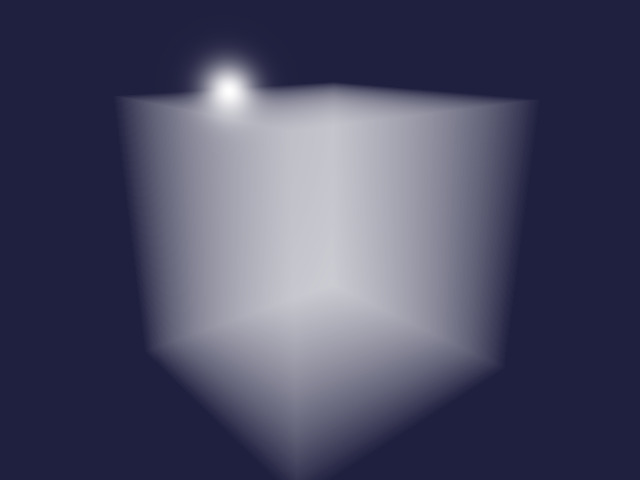
The following fragment shader is used to render an image of a box filled with fog.

  • The pixel coordinate and the resolution of the image are used to determine a viewing direction which also gets rotated using the rotation matrix and normalized.
  • The origin of the camera is set at a specified distance to the center of the box and rotated as well.
  • The ray box function is used to determine the near and far intersection points of the ray with the box.
  • The cloud transfer function is used to sample the cloud density along the ray and determine the overall opacity and color of the fog box.
  • The background is a mix of blue color and a small blob of white where the viewing direction points to the light source.
  • The opacity value of the fog is used to overlay the fog color over the background.
(def fragment-cloud
"#version 130
uniform vec2 resolution;
uniform vec3 light;
uniform mat3 rotation;
uniform float focal_length;
uniform float distance;
out vec4 fragColor;
vec2 ray_box(vec3 box_min, vec3 box_max, vec3 origin, vec3 direction);
vec4 cloud_transfer(vec3 origin, vec3 direction, vec2 interval);
void main()
{
  vec3 direction =
    normalize(rotation * vec3(gl_FragCoord.xy - 0.5 * resolution, focal_length));
  vec3 origin = rotation * vec3(0, 0, -distance);
  vec2 interval = ray_box(vec3(-0.5, -0.5, -0.5), vec3(0.5, 0.5, 0.5), origin, direction);
  vec4 transfer = cloud_transfer(origin, direction, interval);
  vec3 background = mix(vec3(0.125, 0.125, 0.25), vec3(1, 1, 1),
                        pow(dot(direction, light), 1000.0));
  fragColor = vec4(background * (1.0 - transfer.a) + transfer.rgb, 1.0);
}")

Uniform variables are parameters that remain constant throughout the shader execution, unlike vertex input data. Here we use the following uniform variables:

  • resolution: a 2D vector containing the window pixel width and height
  • light: a 3D unit vector pointing to the light source
  • rotation: a 3x3 rotation matrix to rotate the camera around the origin
  • focal_length: the ratio of camera focal length to pixel size of the virtual camera
(defn setup-fog-uniforms
  [program width height]
  (let [rotation     (mulm (rotation-matrix-3d-y (to-radians 40.0))
                           (rotation-matrix-3d-x (to-radians -20.0)))
        focal-length (/ (* 0.5 width) (tan (to-radians 30.0)))
        light        (normalize (vec3 6 1 10))]
    (GL20/glUseProgram program)
    (GL20/glUniform2f (GL20/glGetUniformLocation program "resolution") width height)
    (GL20/glUniform3f (GL20/glGetUniformLocation program "light")
                      (light 0) (light 1) (light 2))
    (GL20/glUniformMatrix3fv (GL20/glGetUniformLocation program "rotation") true
                             (make-float-buffer (mat->float-array rotation)))
    (GL20/glUniform1f (GL20/glGetUniformLocation program "focal_length") focal-length)
    (GL20/glUniform1f (GL20/glGetUniformLocation program "distance") 2.0)))

The following function sets up the shader program, the vertex array object, and the uniform variables. Then GL11/glDrawElements draws the background quad used for performing volumetric rendering.

(defn render-fog
  [width height]
  (let [fragment-sources [ray-box constant-scatter no-shadow (cloud-transfer "fog" 0.01)
                          (fog 1.0) fragment-cloud]
        program          (make-program-with-shaders [vertex-passthrough] fragment-sources)
        vao              (setup-quad-vao)]
    (setup-point-attribute program)
    (try
      (render-array width height
                    (setup-fog-uniforms program width height)
                    (GL11/glDrawElements GL11/GL_QUADS 4 GL11/GL_UNSIGNED_INT 0))
      (finally
        (teardown-vao vao)
        (GL20/glDeleteProgram program)))))

We also need to convert the floating point array to a tensor and then to a BufferedImage. The one-dimensional array gets converted to a tensor and then reshaped to a 3D tensor containing width × height RGBA values. The RGBA data is converted to BGR data and then multiplied with 255 and clamped. Finally the tensor is converted to a BufferedImage.

(defn rgba-array->bufimg [data width height]
  (-> data
      tensor/->tensor
      (tensor/reshape [height width 4])
      (tensor/select :all :all [2 1 0])
      (dfn/* 255)
      (clamp 0 255)
      bufimg/tensor->image))

Finally we are ready to render the volumetric fog.

(rgba-array->bufimg (render-fog 640 480) 640 480)

volumetric fog

Rendering of 3D noise

This method converts a floating point array to a buffer and initialises a 3D texture with it. It is also necessary to set the texture parameters for interpolation and wrapping.

(defn float-array->texture3d
  [data size]
  (let [buffer  (make-float-buffer data)
        texture (GL11/glGenTextures)]
    (GL11/glBindTexture GL12/GL_TEXTURE_3D texture)
    (GL12/glTexImage3D GL12/GL_TEXTURE_3D 0 GL30/GL_R32F size size size 0
                       GL11/GL_RED GL11/GL_FLOAT buffer)
    (GL11/glTexParameteri GL12/GL_TEXTURE_3D GL11/GL_TEXTURE_MIN_FILTER GL11/GL_LINEAR)
    (GL11/glTexParameteri GL12/GL_TEXTURE_3D GL11/GL_TEXTURE_MAG_FILTER GL11/GL_LINEAR)
    (GL11/glTexParameteri GL12/GL_TEXTURE_3D GL11/GL_TEXTURE_WRAP_S GL11/GL_REPEAT)
    (GL11/glTexParameteri GL12/GL_TEXTURE_3D GL11/GL_TEXTURE_WRAP_T GL11/GL_REPEAT)
    (GL11/glTexParameteri GL12/GL_TEXTURE_3D GL12/GL_TEXTURE_WRAP_R GL11/GL_REPEAT)
    texture))

Here a mixture of 3D Perlin and Worley noise is created.

(def noise3d (dfn/- (dfn/* 0.3 (perlin-noise (make-noise-params 32 4 3)))
                    (dfn/* 0.7 (worley-noise (make-noise-params 32 4 3)))))

The noise is normalised to be between 0 and 1.

(def noise-3d-norm (dfn/* (/ 1.0 (- (dfn/reduce-max noise3d) (dfn/reduce-min noise3d)))
                          (dfn/- noise3d (dfn/reduce-min noise3d))))

Then the noise data is converted to a 3D texture.

(def noise-texture (float-array->texture3d (dtype/->float-array noise-3d-norm) 32))

Instead of a constant density fog, we can use the noise as a density function.

(def noise-shader
"#version 130
uniform sampler3D noise3d;
float noise(vec3 idx)
{
  return texture(noise3d, idx).r;
}")

We also set the uniform sampler to texture slot 0 and bind the noise texture to that slot.

(defn setup-noise-uniforms
  [program width height]
  (setup-fog-uniforms program width height)
  (GL20/glUniform1i (GL20/glGetUniformLocation program "noise3d") 0)
  (GL13/glActiveTexture GL13/GL_TEXTURE0)
  (GL11/glBindTexture GL12/GL_TEXTURE_3D noise-texture))

Similar to the fog example above, we define a method to render the noise.

(defn render-noise
  [width height & cloud-shaders]
  (let [fragment-sources (concat cloud-shaders [ray-box fragment-cloud])
        program          (make-program-with-shaders [vertex-passthrough] fragment-sources)
        vao              (setup-quad-vao)]
    (try
      (setup-point-attribute program)
      (render-array width height
                    (setup-noise-uniforms program width height)
                    (GL11/glDrawElements GL11/GL_QUADS 4 GL11/GL_UNSIGNED_INT 0))
      (finally
        (teardown-vao vao)
        (GL20/glDeleteProgram program)))))

Now we can render the mixture of 3D Perlin and Worley noise using a step size of 0.01.

(rgba-array->bufimg
  (render-noise 640 480
                constant-scatter no-shadow (cloud-transfer "noise" 0.01) noise-shader)
  640 480)

3D noise

Remap and clamp 3D noise

We define a method to map a range of input values to a range of output values and clamp the result.

(def remap-clamp
"#version 130
float remap_clamp(float value, float low1, float high1, float low2, float high2)
{
  float t = (value - low1) / (high1 - low1);
  return clamp(low2 + t * (high2 - low2), low2, high2);
}")

A probing shader is used to test the remap_clamp function.

(def remap-probe
  (template/fn [value low1 high1 low2 high2]
"#version 130
out vec4 fragColor;
float remap_clamp(float value, float low1, float high1, float low2, float high2);
void main()
{
  fragColor = vec4(remap_clamp(<%= value %>,
                               <%= low1 %>, <%= high1 %>,
                               <%= low2 %>, <%= high2 %>));
}"))

remap_clamp is tested using a parametrized tests.

(tabular "Remap and clamp input parameter values"
       (fact (first (render-pixel
                      [vertex-passthrough]
                      [remap-clamp (remap-probe ?value ?low1 ?high1 ?low2 ?high2)]))
             => ?expected)
       ?value ?low1 ?high1 ?low2 ?high2 ?expected
       0      0     1      0     1      0.0
       1      0     1      0     1      1.0
       0      0     1      2     3      2.0
       1      0     1      2     3      3.0
       2      2     3      0     1      0.0
       3      2     3      0     1      1.0
       1      0     2      0     4      2.0
       0      1     2      1     2      1.0
       3      1     2      1     2      2.0)

We use the remap-noise method to map the 3D noise to the output range. The base noise function and the remapping parameters are template parameters.

(def remap-noise
  (template/fn [base low1 high1 high2]
"#version 130
float <%= base %>(vec3 idx);
float remap_clamp(float value, float low1, float high1, float low2, float high2);
float remap_noise(vec3 idx)
{
  return remap_clamp(<%= base %>(idx), <%= low1 %>, <%= high1 %>, 0.0, <%= high2 %>);
}"))

We are going to use the following value as the upper value of the cloud density.

(def cloud-strength 6.5)

Now we can render the remapped noise values.

(rgba-array->bufimg
  (render-noise 640 480
                constant-scatter no-shadow (cloud-transfer "remap_noise" 0.01)
                remap-clamp (remap-noise "noise" 0.45 0.9 cloud-strength) noise-shader)
  640 480)

Remapped 3D noise

Octaves of 3D noise

Earlier we defined a function for creating octaves of 3D noise. Here we create octaves of noise before remapping and clamping the values.

(rgba-array->bufimg
  (render-noise 640 480 constant-scatter no-shadow (cloud-transfer "remap_noise" 0.01)
                remap-clamp (remap-noise "octaves" 0.45 0.9 cloud-strength)
                (noise-octaves (octaves 4 0.5)) noise-shader)
  640 480)

Octaves of 3D noise

Mie scattering

In-scattering of light towards the observer depends of the angle between light source and viewing direction. Here we are going to use the phase function by Cornette and Shanks which depends on the asymmetry g and mu = cos(theta).

(def mie-scatter
  (template/fn [g]
"#version 450 core
#define M_PI 3.1415926535897932384626433832795
#define ANISOTROPIC 0.25
#define G <%= g %>
uniform vec3 light;
float mie(float mu)
{
  return 3 * (1 - G * G) * (1 + mu * mu) /
    (8 * M_PI * (2 + G * G) * pow(1 + G * G - 2 * G * mu, 1.5));
}
float in_scatter(vec3 point, vec3 direction)
{
  return mix(1.0, mie(dot(light, direction)), ANISOTROPIC);
}"))

We define a probing shader.

(def mie-probe
  (template/fn [mu]
"#version 450 core
out vec4 fragColor;
float mie(float mu);
void main()
{
  float result = mie(<%= mu %>);
  fragColor = vec4(result, 0, 0, 1);
}"))

The shader is tested using a few values.

(tabular "Shader function for scattering phase function"
         (fact (first (render-pixel [vertex-passthrough]
                                    [(mie-scatter ?g) (mie-probe ?mu)]))
               => (roughly ?result 1e-6))
         ?g  ?mu ?result
         0   0   (/ 3 (* 16 PI))
         0   1   (/ 6 (* 16 PI))
         0  -1   (/ 6 (* 16 PI))
         0.5 0   (/ (* 3 0.75) (* 8 PI 2.25 (pow 1.25 1.5)))
         0.5 1   (/ (* 6 0.75) (* 8 PI 2.25 (pow 0.25 1.5))))

We can define a function to compute a particular value of the scattering phase function using the GPU.

(defn scatter-amount [theta]
  (first (render-pixel [vertex-passthrough] [(mie-scatter 0.76) (mie-probe (cos theta))])))

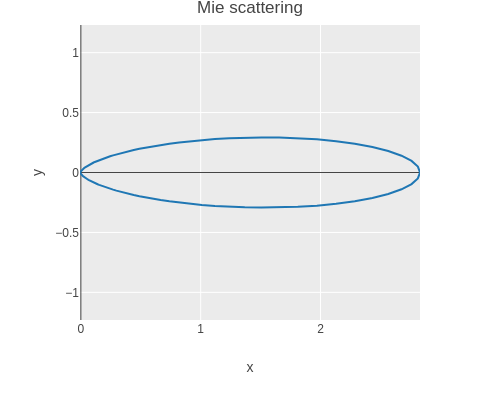
We can use this function to plot Mie scattering for different angles.

(let [scatter
      (tc/dataset {:x (map (fn [theta]
                               (* (cos (to-radians theta))
                                  (scatter-amount (to-radians theta))))
                           (range 361))
                   :y (map (fn [theta]
                               (* (sin (to-radians theta))
                                  (scatter-amount (to-radians theta))))
                           (range 361)) })]
  (-> scatter
      (plotly/base {:=title "Mie scattering" :=mode "lines"})
      (plotly/layer-point {:=x :x :=y :y})
      plotly/plot
      (assoc-in [:layout :yaxis :scaleanchor] "x")))

Mie scattering

We replace the in_scatter placeholder from earlier with the Mie scattering and now the clouds look a bit more realistic.

(rgba-array->bufimg
  (render-noise 640 480 (mie-scatter 0.76) no-shadow (cloud-transfer "remap_noise" 0.01)
                remap-clamp (remap-noise "octaves" 0.45 0.9 cloud-strength)
                (noise-octaves (octaves 4 0.5)) noise-shader)
  640 480)

Clouds with Mie scattering

Self-shading of clouds

Finally we can implement the shadow function by also sampling towards the light source to compute the shading value at each point. Testing the function requires extending the render-pixel function to accept a function for setting the light uniform. We leave this as an exercise for the interested reader 😉.

(def shadow
  (template/fn [noise step]
"#version 130
#define STEP <%= step %>
uniform vec3 light;
float <%= noise %>(vec3 idx);
vec2 ray_box(vec3 box_min, vec3 box_max, vec3 origin, vec3 direction);
float shadow(vec3 point)
{
  vec2 interval = ray_box(vec3(-0.5, -0.5, -0.5), vec3(0.5, 0.5, 0.5), point, light);
  float result = 1.0;
  for (float t = interval.x + 0.5 * STEP; t < interval.y; t += STEP) {
    float density = <%= noise %>(point + t * light);
    float transmittance = exp(-density * STEP);
    result *= transmittance;
  };
  return result;
}"))
The final result is starting to look realistic.

(rgba-array->bufimg
  (render-noise 640 480
                (mie-scatter 0.76) (shadow "remap_noise" 0.05)
                (cloud-transfer "remap_noise" 0.01) remap-clamp
                (remap-noise "octaves" 0.45 0.9 cloud-strength)
                (noise-octaves (octaves 4 0.5)) noise-shader)
  640 480)

Clouds with self-shading

Tidy up

Finally we free the texture, destroy the window, and terminate GLFW.

(GL11/glBindTexture GL12/GL_TEXTURE_3D 0)
(GL11/glDeleteTextures noise-texture)

(GLFW/glfwDestroyWindow window)

(GLFW/glfwTerminate)

Further topics

I hope you enjoyed this little tour of volumetric clouds. Here are some references to get from a cloud prototype to more realistic clouds.

Clojure in your browser

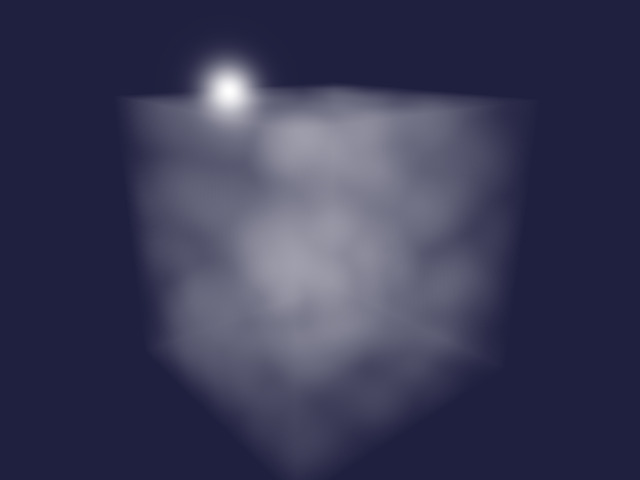
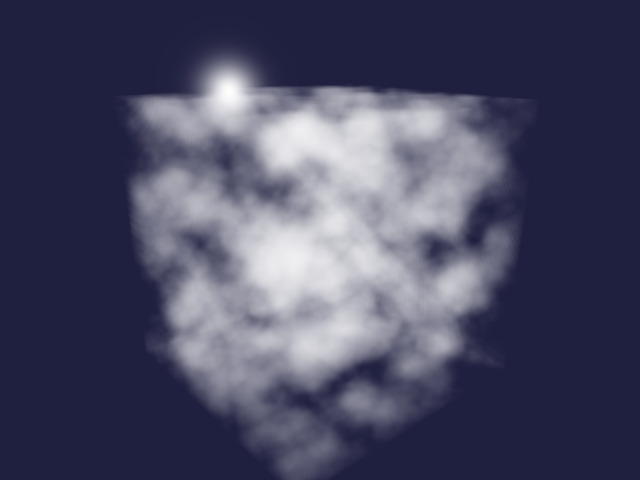
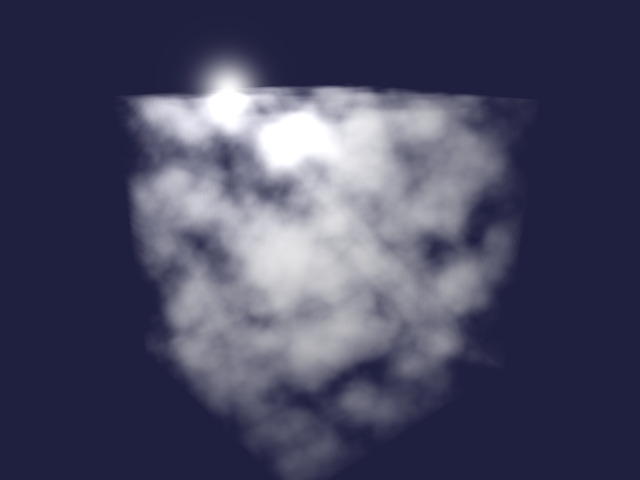
There is a recent article on Clojure Civitas on using Scittle for browser native slides. Scittle is a Clojure interpreter that runs in the browser. It even defines a script tag that let’s you embed Clojure code in your HTML code. Here is an example evaluating the content of an HTML textarea:

HTML code

<script src="https://cdn.jsdelivr.net/npm/scittle@0.6.22/dist/scittle.js"></script>
<script type="application/x-scittle">
(defn run []
  (let [code (.-value (js/document.getElementById "code"))
        output-elem (js/document.getElementById "output")]
    (try
      (let [result (js/scittle.core.eval_string code)]
        (set! (.-textContent output-elem) (str result)))
      (catch :default e
        (set! (.-textContent output-elem)
              (str "Error: " (.-message e)))))))

(set! (.-run js/window) run)
</script>
<textarea id="code" rows="20" style="width:100%;">
(defn primes [i p]
  (if (some #(zero? (mod i %)) p)
    (recur (inc i) p)
    (cons i (lazy-seq (primes (inc i) (conj p i))))))

(take 100 (primes 2 []))
</textarea>
<br />
<button id="run-button" onclick="run()">Run</button>
<pre id="output"></pre>

Scittle in your browser


OpenGL Visualization with LWJGL

Using LWJGL’s OpenGL bindings and Fastmath to render data from NASA’s CGI Moon Kit

(Cross posting article published at Clojure Civitas)

Getting dependencies

First we need to get some libraries and we can use add-libs to fetch them.

(add-libs {'org.lwjgl/lwjgl                      {:mvn/version "3.3.6"}
           'org.lwjgl/lwjgl$natives-linux        {:mvn/version "3.3.6"}
           'org.lwjgl/lwjgl-opengl               {:mvn/version "3.3.6"}
           'org.lwjgl/lwjgl-opengl$natives-linux {:mvn/version "3.3.6"}
           'org.lwjgl/lwjgl-glfw                 {:mvn/version "3.3.6"}
           'org.lwjgl/lwjgl-glfw$natives-linux   {:mvn/version "3.3.6"}
           'org.lwjgl/lwjgl-stb                  {:mvn/version "3.3.6"}
           'org.lwjgl/lwjgl-stb$natives-linux    {:mvn/version "3.3.6"}
           'generateme/fastmath                  {:mvn/version "3.0.0-alpha3"}})
(require '[clojure.java.io :as io]
         '[clojure.math :refer (PI to-radians)]
         '[fastmath.vector :refer (vec3 sub add mult normalize)])
(import '[javax.imageio ImageIO]
        '[org.lwjgl BufferUtils]
        '[org.lwjgl.glfw GLFW]
        '[org.lwjgl.opengl GL GL11 GL13 GL15 GL20 GL30]
        '[org.lwjgl.stb STBImageWrite])

Creating the window

Next we choose the window width and height.

(def window-width 640)
(def window-height 480)
(def radius 1737.4)

We define a function to get the temporary directory.

(defn tmpdir
  []
  (System/getProperty "java.io.tmpdir"))

And then a function to get a temporary file name.

(defn tmpname
  []
  (str (tmpdir) "/civitas-" (java.util.UUID/randomUUID) ".tmp"))

The following function is used to create screenshots for this article. We read the pixels, write them to a temporary file using the STB library and then convert it to an ImageIO object.

(defn screenshot
  []
  (let [filename (tmpname)
        buffer   (java.nio.ByteBuffer/allocateDirect (* 4 window-width window-height))]
    (GL11/glReadPixels 0 0 window-width window-height
                       GL11/GL_RGBA GL11/GL_UNSIGNED_BYTE buffer)
    (STBImageWrite/stbi_write_png filename window-width window-height 4
                                  buffer (* 4 window-width))
    (-> filename io/file (ImageIO/read))))

We need to initialize the GLFW library.

(GLFW/glfwInit)

Now we create an invisible window. You can create a visisble window if you want to by not setting the visibility hint to false.

(def window
  (do
    (GLFW/glfwDefaultWindowHints)
    (GLFW/glfwWindowHint GLFW/GLFW_VISIBLE GLFW/GLFW_FALSE)
    (GLFW/glfwCreateWindow window-width window-height "Invisible Window" 0 0)))

If you have a visible window, you can show it as follows.

(GLFW/glfwShowWindow window)

Note that if you are using a visible window, you always need to swap buffers after rendering.

(GLFW/glfwSwapBuffers window)
(do
  (GLFW/glfwMakeContextCurrent window)
  (GL/createCapabilities))

Basic rendering

Clearing the window

A simple test is to set a clear color and clear the window.

(do
  (GL11/glClearColor 1.0 0.5 0.25 1.0)
  (GL11/glClear GL11/GL_COLOR_BUFFER_BIT)
  (screenshot))

screenshot 0

Creating shader programs

We define a convenience function to compile a shader and handle any errors.

(defn make-shader [source shader-type]
  (let [shader (GL20/glCreateShader shader-type)]
    (GL20/glShaderSource shader source)
    (GL20/glCompileShader shader)
    (when (zero? (GL20/glGetShaderi shader GL20/GL_COMPILE_STATUS))
      (throw (Exception. (GL20/glGetShaderInfoLog shader 1024))))
    shader))

We also define a convenience function to link a program and handle any errors.

(defn make-program [& shaders]
  (let [program (GL20/glCreateProgram)]
    (doseq [shader shaders]
           (GL20/glAttachShader program shader)
           (GL20/glDeleteShader shader))
    (GL20/glLinkProgram program)
    (when (zero? (GL20/glGetProgrami program GL20/GL_LINK_STATUS))
      (throw (Exception. (GL20/glGetProgramInfoLog program 1024))))
    program))

The following code shows a simple vertex shader which passes through vertex coordinates.

(def vertex-source "
#version 130

in vec3 point;

void main()
{
  gl_Position = vec4(point, 1);
}")

In the fragment shader we use the pixel coordinates to output a color ramp. The uniform variable iResolution will later be set to the window resolution.

(def fragment-source "
#version 130

uniform vec2 iResolution;
out vec4 fragColor;

void main()
{
  fragColor = vec4(gl_FragCoord.xy / iResolution.xy, 0, 1);
}")

Let’s compile the shaders and link the program.

(do
  (def vertex-shader (make-shader vertex-source GL20/GL_VERTEX_SHADER))
  (def fragment-shader (make-shader fragment-source GL20/GL_FRAGMENT_SHADER))
  (def program (make-program vertex-shader fragment-shader)))

Note: It is beyond the topic of this talk, but you can set up a Clojure function to test an OpenGL shader function by using a probing fragment shader and rendering to a one pixel texture. Please see my article Test Driven Development with OpenGL for more information!

Creating vertex buffer data

To provide the shader program with vertex data we are going to define just a single quad consisting of four vertices.

First we define a macro and use it to define convenience functions for converting arrays to LWJGL buffer objects.

(defmacro def-make-buffer [method create-buffer]
  `(defn ~method [data#]
     (let [buffer# (~create-buffer (count data#))]
       (.put buffer# data#)
       (.flip buffer#)
       buffer#)))
(do
  (def-make-buffer make-float-buffer BufferUtils/createFloatBuffer)
  (def-make-buffer make-int-buffer BufferUtils/createIntBuffer)
  (def-make-buffer make-byte-buffer BufferUtils/createByteBuffer))

We define a simple background quad spanning the entire window. We use normalised device coordinates (NDC) which are between -1 and 1.

(def vertices
  (float-array [ 1.0  1.0 0.0
                -1.0  1.0 0.0
                -1.0 -1.0 0.0
                 1.0 -1.0 0.0]))

The index array defines the order of the vertices.

(def indices
  (int-array [0 1 2 3]))

Setting up the vertex buffer

We add a convenience function to setup VAO, VBO, and IBO.

  • We define a vertex array object (VAO) which acts like a context for the vertex and index buffer.
  • We define a vertex buffer object (VBO) which contains the vertex data.
  • We also define an index buffer object (IBO) which contains the index data.
(defn setup-vao [vertices indices]
  (let [vao (GL30/glGenVertexArrays)
        vbo (GL15/glGenBuffers)
        ibo (GL15/glGenBuffers)]
    (GL30/glBindVertexArray vao)
    (GL15/glBindBuffer GL15/GL_ARRAY_BUFFER vbo)
    (GL15/glBufferData GL15/GL_ARRAY_BUFFER (make-float-buffer vertices)
                       GL15/GL_STATIC_DRAW)
    (GL15/glBindBuffer GL15/GL_ELEMENT_ARRAY_BUFFER ibo)
    (GL15/glBufferData GL15/GL_ELEMENT_ARRAY_BUFFER (make-int-buffer indices)
                       GL15/GL_STATIC_DRAW)
    {:vao vao :vbo vbo :ibo ibo}))

Now we use the function to setup the VAO, VBO, and IBO.

(def vao (setup-vao vertices indices))

The data of each vertex is defined by 3 floats (x, y, z). We need to specify the layout of the vertex buffer object so that OpenGL knows how to interpret it.

(do
  (GL20/glVertexAttribPointer (GL20/glGetAttribLocation program "point") 3
                              GL11/GL_FLOAT false (* 3 Float/BYTES) (* 0 Float/BYTES))
  (GL20/glEnableVertexAttribArray 0))

Rendering the quad

We select the program and define the uniform variable iResolution.

(do
  (GL20/glUseProgram program)
  (GL20/glUniform2f (GL20/glGetUniformLocation program "iResolution")
                    window-width window-height))

Since the correct VAO is already bound from the earlier example, we are now ready to draw the quad.

(GL11/glDrawElements GL11/GL_QUADS (count indices) GL11/GL_UNSIGNED_INT 0)
(screenshot)

screenshot 1

This time the quad shows a color ramp!

Finishing up

We only delete the program since we are going to reuse the VAO in the next example.

(GL20/glDeleteProgram program)

Rendering a Texture

Getting the NASA data

We define a function to download a file from the web.

(defn download [url target]
  (with-open [in (io/input-stream url)
              out (io/output-stream target)]
    (io/copy in out)))

If it does not exist, we download the lunar color map from the NASA CGI Moon Kit.

(do
  (def moon-tif "src/opengl_visualization/lroc_color_poles_2k.tif")
  (when (not (.exists (io/file moon-tif)))
    (download
      "https://svs.gsfc.nasa.gov/vis/a000000/a004700/a004720/lroc_color_poles_2k.tif"
      moon-tif)))

Create a texture

Next we load the image using ImageIO.

(do
  (def color (ImageIO/read (io/file moon-tif)))
  (def color-raster (.getRaster color))
  (def color-width (.getWidth color-raster))
  (def color-height (.getHeight color-raster))
  (def color-channels (.getNumBands color-raster))
  (def color-pixels (int-array (* color-width color-height color-channels)))
  (.getPixels color-raster 0 0 color-width color-height color-pixels)
  [color-width color-height color-channels])
; [2048 1024 3]

Then we create an OpenGL texture from the RGB data.

(do
  (def texture-color (GL11/glGenTextures))
  (GL11/glBindTexture GL11/GL_TEXTURE_2D texture-color)
  (GL11/glTexImage2D GL11/GL_TEXTURE_2D 0 GL11/GL_RGBA color-width color-height 0
                     GL11/GL_RGB GL11/GL_UNSIGNED_BYTE
                     (make-byte-buffer (byte-array (map unchecked-byte color-pixels))))
  (GL11/glTexParameteri GL11/GL_TEXTURE_2D GL11/GL_TEXTURE_MIN_FILTER GL11/GL_LINEAR)
  (GL11/glTexParameteri GL11/GL_TEXTURE_2D GL11/GL_TEXTURE_MAG_FILTER GL11/GL_LINEAR)
  (GL11/glTexParameteri GL11/GL_TEXTURE_2D GL11/GL_TEXTURE_WRAP_S GL11/GL_REPEAT)
  (GL11/glTexParameteri GL11/GL_TEXTURE_2D GL11/GL_TEXTURE_WRAP_T GL11/GL_REPEAT)
  (GL11/glBindTexture GL11/GL_TEXTURE_2D 0))

Rendering the texture

We are going to use the vertex pass through shader again.

(def vertex-tex "
#version 130

in vec3 point;

void main()
{
  gl_Position = vec4(point, 1);
}")

The fragment shader now uses the texture function to lookup color values from a texture.

(def fragment-tex "
#version 130

uniform vec2 iResolution;
uniform sampler2D moon;
out vec4 fragColor;

void main()
{
  fragColor = texture(moon, gl_FragCoord.xy / iResolution.xy);
}")

We compile and link the shaders to create a program.

(do
  (def vertex-tex-shader (make-shader vertex-tex GL20/GL_VERTEX_SHADER))
  (def fragment-tex-shader (make-shader fragment-tex GL20/GL_FRAGMENT_SHADER))
  (def tex-program (make-program vertex-tex-shader fragment-tex-shader)))

We need to set up the layout of the vertex data again.

(do
  (GL20/glVertexAttribPointer (GL20/glGetAttribLocation tex-program "point") 3
                              GL11/GL_FLOAT false (* 3 Float/BYTES) (* 0 Float/BYTES))
  (GL20/glEnableVertexAttribArray 0))

We set the resolution and bind the texture to the texture slot number 0.

(do
  (GL20/glUseProgram tex-program)
  (GL20/glUniform2f (GL20/glGetUniformLocation tex-program "iResolution")
                    window-width window-height)
  (GL20/glUniform1i (GL20/glGetUniformLocation tex-program "moon") 0)
  (GL13/glActiveTexture GL13/GL_TEXTURE0)
  (GL11/glBindTexture GL11/GL_TEXTURE_2D texture-color))

The quad now is textured!

(do
  (GL11/glDrawElements GL11/GL_QUADS (count indices) GL11/GL_UNSIGNED_INT 0)
  (screenshot))

screenshot 2

Finishing up

We create a convenience function to tear down the VAO, VBO, and IBO.

(defn teardown-vao [{:keys [vao vbo ibo]}]
  (GL15/glBindBuffer GL15/GL_ELEMENT_ARRAY_BUFFER 0)
  (GL15/glDeleteBuffers ibo)
  (GL15/glBindBuffer GL15/GL_ARRAY_BUFFER 0)
  (GL15/glDeleteBuffers vbo)
  (GL30/glBindVertexArray 0)
  (GL15/glDeleteBuffers vao))

We tear down the quad.

(teardown-vao vao)

We also delete the program.

(GL20/glDeleteProgram tex-program)

Render a 3D cube

Create vertex data

If we want to render a cube, we need to define 8 vertices.

(def vertices-cube
  (float-array [-1.0 -1.0 -1.0
                 1.0 -1.0 -1.0
                 1.0  1.0 -1.0
                -1.0  1.0 -1.0
                -1.0 -1.0  1.0
                 1.0 -1.0  1.0
                 1.0  1.0  1.0
                -1.0  1.0  1.0]))

The cube is made up of 6 quads, with 4 vertex indices per quad. So we require 6 * 4 = 24 indices.

(def indices-cube
  (int-array [0 1 2 3
              7 6 5 4
              0 3 7 4
              5 6 2 1
              3 2 6 7
              4 5 1 0]))

Initialize vertex buffer array

We use the function from earlier to set up the VAO, VBO, and IBO.

(def vao-cube (setup-vao vertices-cube indices-cube))

Shader program mapping texture onto cube

We first define a vertex shader, which takes cube coordinates, rotates, translates, and projects them.

(def vertex-moon "
#version 130

uniform float fov;
uniform float alpha;
uniform float beta;
uniform float distance;
uniform vec2 iResolution;
in vec3 point;
out vec3 vpoint;

void main()
{
  // Rotate and translate vertex
  mat3 rot_y = mat3(vec3(cos(alpha), 0, sin(alpha)),
                    vec3(0, 1, 0),
                    vec3(-sin(alpha), 0, cos(alpha)));
  mat3 rot_x = mat3(vec3(1, 0, 0),
                    vec3(0, cos(beta), -sin(beta)),
                    vec3(0, sin(beta), cos(beta)));
  vec3 p = rot_x * rot_y * point + vec3(0, 0, distance);

  // Project vertex creating normalized device coordinates
  float f = 1.0 / tan(fov / 2.0);
  float aspect = iResolution.x / iResolution.y;
  float proj_x = p.x / p.z * f;
  float proj_y = p.y / p.z * f * aspect;
  float proj_z = p.z / (2.0 * distance);

  // Output to shader pipeline.
  gl_Position = vec4(proj_x, proj_y, proj_z, 1);
  vpoint = point;
}")

The fragment shader maps the texture onto the cube.

(def fragment-moon "
#version 130

#define PI 3.1415926535897932384626433832795

uniform sampler2D moon;
in vec3 vpoint;
out vec4 fragColor;

vec2 lonlat(vec3 p)
{
  float lon = atan(p.x, -p.z) / (2.0 * PI) + 0.5;
  float lat = atan(p.y, length(p.xz)) / PI + 0.5;
  return vec2(lon, lat);
}

vec3 color(vec2 lonlat)
{
  return texture(moon, lonlat).rgb;
}

void main()
{
  fragColor = vec4(color(lonlat(vpoint)).rgb, 1);
}")

We compile and link the shaders.

(do
  (def vertex-shader-moon (make-shader vertex-moon GL30/GL_VERTEX_SHADER))
  (def fragment-shader-moon (make-shader fragment-moon GL30/GL_FRAGMENT_SHADER))
  (def program-moon (make-program vertex-shader-moon fragment-shader-moon)))

We need to set up the memory layout again.

(do
  (GL20/glVertexAttribPointer (GL20/glGetAttribLocation program-moon "point") 3
                              GL11/GL_FLOAT false (* 3 Float/BYTES) (* 0 Float/BYTES))
  (GL20/glEnableVertexAttribArray 0))

Rendering the cube

This shader program requires setup of several uniforms and a texture.

(do
  (GL20/glUseProgram program-moon)
  (GL20/glUniform2f (GL20/glGetUniformLocation program-moon "iResolution")
                    window-width window-height)
  (GL20/glUniform1f (GL20/glGetUniformLocation program-moon "fov") (to-radians 25.0))
  (GL20/glUniform1f (GL20/glGetUniformLocation program-moon "alpha") (to-radians 30.0))
  (GL20/glUniform1f (GL20/glGetUniformLocation program-moon "beta") (to-radians -20.0))
  (GL20/glUniform1f (GL20/glGetUniformLocation program-moon "distance") 10.0)
  (GL20/glUniform1i (GL20/glGetUniformLocation program-moon "moon") 0)
  (GL13/glActiveTexture GL13/GL_TEXTURE0)
  (GL11/glBindTexture GL11/GL_TEXTURE_2D texture-color))

We enable back face culling to only render the front faces of the cube. Then we clear the window and render the cube.

(do
  (GL11/glEnable GL11/GL_CULL_FACE)
  (GL11/glCullFace GL11/GL_BACK)
  (GL11/glClearColor 0.0 0.0 0.0 1.0)
  (GL11/glClear GL11/GL_COLOR_BUFFER_BIT)
  (GL11/glDrawElements GL11/GL_QUADS (count indices-cube) GL11/GL_UNSIGNED_INT 0)
  (screenshot))

screenshot 3

This looks interesting but it is not a good approximation of the moon.

Finishing up

To finish up we delete the vertex data for the cube.

(teardown-vao vao-cube)

Approximating a sphere

Creating the vertex data

First we partition the vertex data and convert the triplets to 8 Fastmath vectors.

(def points
  (map #(apply vec3 %)
       (partition 3 vertices-cube)))
points
; ([-1.0 -1.0 -1.0]
;  [1.0 -1.0 -1.0]
;  [1.0 1.0 -1.0]
;  [-1.0 1.0 -1.0]
;  [-1.0 -1.0 1.0]
;  [1.0 -1.0 1.0]
;  [1.0 1.0 1.0]
;  [-1.0 1.0 1.0])

Then we use the index array to get the coordinates of the first corner of each face resulting in 6 Fastmath vectors.

(def corners
  (map (fn [[i _ _ _]] (nth points i))
       (partition 4 indices-cube)))
corners
; ([-1.0 -1.0 -1.0]
;  [-1.0 1.0 1.0]
;  [-1.0 -1.0 -1.0]
;  [1.0 -1.0 1.0]
;  [-1.0 1.0 -1.0]
;  [-1.0 -1.0 1.0])

We get the first spanning vector of each face by subtracting the second corner from the first.

(def u-vectors
  (map (fn [[i j _ _]] (sub (nth points j) (nth points i)))
       (partition 4 indices-cube)))
u-vectors
; ([2.0 0.0 0.0]
;  [2.0 0.0 0.0]
;  [0.0 2.0 0.0]
;  [0.0 2.0 0.0]
;  [2.0 0.0 0.0]
;  [2.0 0.0 0.0])

We get the second spanning vector of each face by subtracting the fourth corner from the first.

(def v-vectors
  (map (fn [[i _ _ l]] (sub (nth points l) (nth points i)))
       (partition 4 indices-cube)))
v-vectors
; ([0.0 2.0 0.0]
;  [0.0 -2.0 0.0]
;  [0.0 0.0 2.0]
;  [0.0 0.0 -2.0]
;  [0.0 0.0 2.0]
;  [0.0 0.0 -2.0])

We can now use vector math to subsample the faces and project the points onto a sphere by normalizing the vectors and multiplying with the moon radius.

(defn sphere-points [n c u v]
  (for [j (range (inc n)) i (range (inc n))]
       (mult (normalize (add c (add (mult u (/ i n)) (mult v (/ j n))))) radius)))

Subdividing once results in 9 corners for a cube face.

(sphere-points 2 (nth corners 0) (nth u-vectors 0) (nth v-vectors 0))
; ([-1003.088357690056 -1003.088357690056 -1003.088357690056]
;  [0.0 -1228.5273216335077 -1228.5273216335077]
;  [1003.088357690056 -1003.088357690056 -1003.088357690056]
;  [-1228.5273216335077 0.0 -1228.5273216335077]
;  [0.0 0.0 -1737.4]
;  [1228.5273216335077 0.0 -1228.5273216335077]
;  [-1003.088357690056 1003.088357690056 -1003.088357690056]
;  [0.0 1228.5273216335077 -1228.5273216335077]
;  [1003.088357690056 1003.088357690056 -1003.088357690056])

We also need a function to generate the indices for the quads.

(defn sphere-indices [n face]
  (for [j (range n) i (range n)]
       (let [offset (+ (* face (inc n) (inc n)) (* j (inc n)) i)]
         [offset (inc offset) (+ offset n 2) (+ offset n 1)])))

Subdividing once results in 4 quads for a cube face.

(sphere-indices 2 0)
; ([0 1 4 3] [1 2 5 4] [3 4 7 6] [4 5 8 7])

Rendering a coarse approximation of the sphere.

We subdivide once (n=2) and create a VAO with the data.

(do
  (def n 2)
  (def vertices-sphere (float-array (flatten (map (partial sphere-points n)
                                                  corners u-vectors v-vectors))))
  (def indices-sphere (int-array (flatten (map (partial sphere-indices n) (range 6)))))
  (def vao-sphere (setup-vao vertices-sphere indices-sphere)))

The layout needs to be configured again.

(do
  (GL20/glVertexAttribPointer (GL20/glGetAttribLocation program-moon "point") 3
                              GL11/GL_FLOAT false (* 3 Float/BYTES) (* 0 Float/BYTES))
  (GL20/glEnableVertexAttribArray 0))

The distance needs to be increased, because the points are on a sphere with the radius of the moon.

(GL20/glUniform1f (GL20/glGetUniformLocation program-moon "distance") (* radius 10.0))

Rendering the mesh now results in a better approximation of a sphere.

(do
  (GL11/glClear GL11/GL_COLOR_BUFFER_BIT)
  (GL11/glDrawElements GL11/GL_QUADS (count indices-sphere) GL11/GL_UNSIGNED_INT 0)
  (screenshot))

screenshot 4

(teardown-vao vao-sphere)

Rendering a fine approximation of the sphere.

To get a high quality approximation we subdivide more and create a VAO with the data. (do

(do
  (def n2 16)
  (def vertices-sphere-high (float-array (flatten (map (partial sphere-points n2) corners u-vectors v-vectors))))
  (def indices-sphere-high (int-array (flatten (map (partial sphere-indices n2) (range 6)))))
  (def vao-sphere-high (setup-vao vertices-sphere-high indices-sphere-high)))

We set up the vertex layout again.

(do
  (GL20/glVertexAttribPointer (GL20/glGetAttribLocation program-moon "point") 3
                              GL11/GL_FLOAT false (* 3 Float/BYTES) (* 0 Float/BYTES))
  (GL20/glEnableVertexAttribArray 0))

Rendering the mesh now results in a spherical mesh with a texture.

(do
  (GL11/glClear GL11/GL_COLOR_BUFFER_BIT)
  (GL11/glDrawElements GL11/GL_QUADS (count indices-sphere-high) GL11/GL_UNSIGNED_INT 0)
  (screenshot))

screenshot 5

(GL20/glDeleteProgram program-moon)

Adding ambient and diffuse reflection

In order to introduce lighting we add ambient and diffuse lighting to the fragment shader. We use the ambient and diffuse lighting from the Phong shading model.

  • The ambient light is a constant value.
  • The diffuse light is calculated using the dot product of the light vector and the normal vector.
(def fragment-moon-diffuse "
#version 130

#define PI 3.1415926535897932384626433832795

uniform vec3 light;
uniform float ambient;
uniform float diffuse;
uniform sampler2D moon;
in vec3 vpoint;
out vec4 fragColor;

vec2 lonlat(vec3 p)
{
  float lon = atan(p.x, -p.z) / (2.0 * PI) + 0.5;
  float lat = atan(p.y, length(p.xz)) / PI + 0.5;
  return vec2(lon, lat);
}

vec3 color(vec2 lonlat)
{
  return texture(moon, lonlat).rgb;
}

void main()
{
  float phong = ambient + diffuse * max(0.0, dot(light, normalize(vpoint)));
  fragColor = vec4(color(lonlat(vpoint)) * phong, 1);
}")

We reuse the vertex shader from the previous example and the new fragment shader.

(do
  (def vertex-shader-diffuse (make-shader vertex-moon GL30/GL_VERTEX_SHADER))
  (def fragment-shader-diffuse (make-shader fragment-moon-diffuse GL30/GL_FRAGMENT_SHADER))
  (def program-diffuse (make-program vertex-shader-diffuse fragment-shader-diffuse)))

We set up the vertex data layout again.

(do
  (GL20/glVertexAttribPointer (GL20/glGetAttribLocation program-diffuse "point") 3
                              GL11/GL_FLOAT false (* 3 Float/BYTES) (* 0 Float/BYTES))
  (GL20/glEnableVertexAttribArray 0))

A normalized light vector is defined.

(def light (normalize (vec3 -1 0 -1)))

Before rendering we need to set up the various uniform values.

(do
  (GL20/glUseProgram program-diffuse)
  (GL20/glUniform2f (GL20/glGetUniformLocation program-diffuse "iResolution")
                    window-width window-height)
  (GL20/glUniform1f (GL20/glGetUniformLocation program-diffuse "fov") (to-radians 20.0))
  (GL20/glUniform1f (GL20/glGetUniformLocation program-diffuse "alpha") (to-radians 0.0))
  (GL20/glUniform1f (GL20/glGetUniformLocation program-diffuse "beta") (to-radians 0.0))
  (GL20/glUniform1f (GL20/glGetUniformLocation program-diffuse "distance") (* radius 10.0))
  (GL20/glUniform1f (GL20/glGetUniformLocation program-diffuse "ambient") 0.0)
  (GL20/glUniform1f (GL20/glGetUniformLocation program-diffuse "diffuse") 1.6)
  (GL20/glUniform3f (GL20/glGetUniformLocation program-diffuse "light")
                    (light 0) (light 1) (light 2))
  (GL20/glUniform1i (GL20/glGetUniformLocation program-diffuse "moon") 0)
  (GL13/glActiveTexture GL13/GL_TEXTURE0)
  (GL11/glBindTexture GL11/GL_TEXTURE_2D texture-color))

Finally we are ready to render the mesh with diffuse shading.

(do
  (GL11/glClear GL11/GL_COLOR_BUFFER_BIT)
  (GL11/glDrawElements GL11/GL_QUADS (count indices-sphere-high) GL11/GL_UNSIGNED_INT 0)
  (screenshot))

screenshot 6

Afterwards we delete the shader program.

(GL20/glDeleteProgram program-diffuse)

Using normal mapping

Load elevation data into texture

In the final section we also want to add normal mapping in order to get realistic shading of craters.

The lunar elevation data is downloaded from NASA’s website.

(do
  (def moon-ldem "src/opengl_visualization/ldem_4.tif")
  (when (not (.exists (io/file moon-ldem)))
    (download "https://svs.gsfc.nasa.gov/vis/a000000/a004700/a004720/ldem_4.tif"
              moon-ldem)))

The image is read using ImageIO and the floating point elevation data is extracted.

(do
  (def ldem (ImageIO/read (io/file moon-ldem)))
  (def ldem-raster (.getRaster ldem))
  (def ldem-width (.getWidth ldem))
  (def ldem-height (.getHeight ldem))
  (def ldem-pixels (float-array (* ldem-width ldem-height)))
  (do (.getPixels ldem-raster 0 0 ldem-width ldem-height ldem-pixels) nil)
  (def resolution (/ (* 2.0 PI radius) ldem-width))
  [ldem-width ldem-height])
; [1440 720]

The floating point pixel data is converted into a texture

(do
  (def texture-ldem (GL11/glGenTextures))
  (GL11/glBindTexture GL11/GL_TEXTURE_2D texture-ldem)
  (GL11/glTexParameteri GL11/GL_TEXTURE_2D GL11/GL_TEXTURE_MIN_FILTER GL11/GL_LINEAR)
  (GL11/glTexParameteri GL11/GL_TEXTURE_2D GL11/GL_TEXTURE_MAG_FILTER GL11/GL_LINEAR)
  (GL11/glTexParameteri GL11/GL_TEXTURE_2D GL11/GL_TEXTURE_WRAP_S GL11/GL_REPEAT)
  (GL11/glTexParameteri GL11/GL_TEXTURE_2D GL11/GL_TEXTURE_WRAP_T GL11/GL_REPEAT)
  (GL11/glTexImage2D GL11/GL_TEXTURE_2D 0 GL30/GL_R32F ldem-width ldem-height 0
                     GL11/GL_RED GL11/GL_FLOAT ldem-pixels))

Create shader program with normal mapping

We reuse the vertex shader from the previous section.

The fragment shader this time is more involved.

  • A horizon matrix with normal, tangent, and bitangent vectors is computed.
  • The elevation is sampled in four directions from the current 3D point.
  • The elevation values are used to create two surface vectors.
  • The cross product of the surface vectors is computed and normalized to get the normal vector.
  • This perturbed normal vector is now used to compute diffuse lighting.
(def fragment-normal "
#version 130

#define PI 3.1415926535897932384626433832795

uniform vec3 light;
uniform float ambient;
uniform float diffuse;
uniform float resolution;
uniform sampler2D moon;
uniform sampler2D ldem;
in vec3 vpoint;
out vec4 fragColor;

vec3 orthogonal_vector(vec3 n)
{
  vec3 b;
  if (abs(n.x) <= abs(n.y)) {
    if (abs(n.x) <= abs(n.z))
      b = vec3(1, 0, 0);
    else
      b = vec3(0, 0, 1);
  } else {
    if (abs(n.y) <= abs(n.z))
      b = vec3(0, 1, 0);
    else
      b = vec3(0, 0, 1);
  };
  return normalize(cross(n, b));
}

mat3 oriented_matrix(vec3 n)
{
  vec3 o1 = orthogonal_vector(n);
  vec3 o2 = cross(n, o1);
  return mat3(n, o1, o2);
}

vec2 lonlat(vec3 p)
{
  float lon = atan(p.x, -p.z) / (2.0 * PI) + 0.5;
  float lat = atan(p.y, length(p.xz)) / PI + 0.5;
  return vec2(lon, lat);
}

vec3 color(vec2 lonlat)
{
  return texture(moon, lonlat).rgb;
}

float elevation(vec3 p)
{
  return texture(ldem, lonlat(p)).r;
}

vec3 normal(mat3 horizon, vec3 p)
{
  vec3 pl = p + horizon * vec3(0, -1,  0) * resolution;
  vec3 pr = p + horizon * vec3(0,  1,  0) * resolution;
  vec3 pu = p + horizon * vec3(0,  0, -1) * resolution;
  vec3 pd = p + horizon * vec3(0,  0,  1) * resolution;
  vec3 u = horizon * vec3(elevation(pr) - elevation(pl), 2 * resolution, 0);
  vec3 v = horizon * vec3(elevation(pd) - elevation(pu), 0, 2 * resolution);
  return normalize(cross(u, v));
}

void main()
{
  mat3 horizon = oriented_matrix(normalize(vpoint));
  float phong = ambient + diffuse * max(0.0, dot(light, normal(horizon, vpoint)));
  fragColor = vec4(color(lonlat(vpoint)).rgb * phong, 1);
}")

We reuse the vertex shader from the previous example and the new fragment shader.

(do
  (def vertex-shader-normal (make-shader vertex-moon GL30/GL_VERTEX_SHADER))
  (def fragment-shader-normal (make-shader fragment-normal GL30/GL_FRAGMENT_SHADER))
  (def program-normal (make-program vertex-shader-normal fragment-shader-normal)))

We set up the vertex data layout again.

(do
  (GL20/glVertexAttribPointer (GL20/glGetAttribLocation program-normal "point") 3
                              GL11/GL_FLOAT false (* 3 Float/BYTES) (* 0 Float/BYTES))
  (GL20/glEnableVertexAttribArray 0))

Apart from the uniform values we also need to set up two textures this time: the color texture and the elevation texture.

(do
  (GL20/glUseProgram program-normal)
  (GL20/glUniform2f (GL20/glGetUniformLocation program-normal "iResolution")
                    window-width window-height)
  (GL20/glUniform1f (GL20/glGetUniformLocation program-normal "fov") (to-radians 20.0))
  (GL20/glUniform1f (GL20/glGetUniformLocation program-normal "alpha") (to-radians 0.0))
  (GL20/glUniform1f (GL20/glGetUniformLocation program-normal "beta") (to-radians 0.0))
  (GL20/glUniform1f (GL20/glGetUniformLocation program-normal "distance") (* radius 10.0))
  (GL20/glUniform1f (GL20/glGetUniformLocation program-normal "resolution") resolution)
  (GL20/glUniform1f (GL20/glGetUniformLocation program-normal "ambient") 0.0)
  (GL20/glUniform1f (GL20/glGetUniformLocation program-normal "diffuse") 1.6)
  (GL20/glUniform3f (GL20/glGetUniformLocation program-normal "light")
                    (light 0) (light 1) (light 2))
  (GL20/glUniform1i (GL20/glGetUniformLocation program-normal "moon") 0)
  (GL20/glUniform1i (GL20/glGetUniformLocation program-normal "ldem") 1)
  (GL13/glActiveTexture GL13/GL_TEXTURE0)
  (GL11/glBindTexture GL11/GL_TEXTURE_2D texture-color)
  (GL13/glActiveTexture GL13/GL_TEXTURE1)
  (GL11/glBindTexture GL11/GL_TEXTURE_2D texture-ldem))

Finally we are ready to render the mesh with normal mapping.

(do
  (GL11/glClear GL11/GL_COLOR_BUFFER_BIT)
  (GL11/glDrawElements GL11/GL_QUADS (count indices-sphere-high) GL11/GL_UNSIGNED_INT 0)
  (screenshot))

screenshot 7

Afterwards we delete the shader program and the vertex data.

(GL20/glDeleteProgram program-normal)
(teardown-vao vao-sphere-high)

And the textures.

(GL11/glDeleteTextures texture-color)
(GL11/glDeleteTextures texture-ldem)

Finalizing GLFW

When we are finished, we destroy the window.

(GLFW/glfwDestroyWindow window)

Finally we terminate use of the GLFW library.

(GLFW/glfwTerminate)

I hope you liked this 3D graphics example.

Note that in practise you will

  • use higher resolution data and map the data onto texture tiles
  • generate textures containing normal maps offline
  • create a multiresolution map
  • use tessellation to increase the mesh resolution
  • use elevation data to deform the mesh

Thanks to Timothy Pratley for helping getting this post online.

Developing a Space Flight Simulator in Clojure

In 2017 I discovered the free of charge Orbiter 2016 space flight simulator which was proprietary at the time and it inspired me to develop a space flight simulator myself. I prototyped some rigid body physics in C and later in GNU Guile and also prototyped loading and rendering of Wavefront OBJ files. I used GNU Guile (a Scheme implementation) because it has a good native interface and of course it has hygienic macros. Eventually I got interested in Clojure because it has more generic multi-methods as well as fast hash maps and vectors. I finally decided to develop the game for real in Clojure. I have been developing a space flight simulator in Clojure for almost 5 years now. While using Clojure I have come to appreciate the immutable values and safe parallelism using atoms, agents, and refs.

In the beginning I decided to work on the hard parts first, which for me were 3D rendering of a planet, an atmosphere, shadows, and volumetric clouds. I read the OpenGL Superbible to get an understanding on what functionality OpenGL provides. When Orbiter was eventually open sourced and released unter MIT license here, I inspected the source code and discovered that about 90% of the code is graphics-related. So starting with the graphics problems was not a bad decision.

Software dependencies

The following software is used for development. The software libraries run on both GNU/Linux and Microsoft Windows.

  • Clojure the programming language
  • LWJGL provides Java wrappers for various libraries
    • lwjgl-opengl for 3D graphics
    • lwjgl-glfw for windowing and input devices
    • lwjgl-nuklear for graphical user interfaces
    • lwjgl-stb for image I/O and using truetype fonts
    • lwjgl-assimp to load glTF 3D models with animation data
  • Jolt Physics to simulate wheeled vehicles and collisions with meshes
  • Fastmath for fast matrix and vector math as well as spline interpolation
  • Comb for templating shader code
  • Instaparse to parse NASA Planetary Constant Kernel (PCK) files
  • Gloss to parse NASA Double Precision Array Files (DAF)
  • Coffi as a foreign function interface
  • core.memoize for least recently used caching of function results
  • Apache Commons Compress to read map tiles from tar files
  • Malli to add schemas to functions
  • Immuconf to load the configuration file
  • Progrock a progress bar for long running builds
  • Claypoole to implement parallel for loops
  • Midje for test-driven development
  • tools.build to build the project
  • clj-async-profiler Clojure profiler creating flame graphs
  • slf4j-timbre Java logging implementation for Clojure

The deps.edn file contains operating system dependent LWJGL bindings. For example on GNU/Linux the deps.edn file contains the following:

{:deps {; ...
        org.lwjgl/lwjgl {:mvn/version "3.3.6"}
        org.lwjgl/lwjgl$natives-linux {:mvn/version "3.3.6"}
        org.lwjgl/lwjgl-opengl {:mvn/version "3.3.6"}
        org.lwjgl/lwjgl-opengl$natives-linux {:mvn/version "3.3.6"}
        org.lwjgl/lwjgl-glfw {:mvn/version "3.3.6"}
        org.lwjgl/lwjgl-glfw$natives-linux {:mvn/version "3.3.6"}
        org.lwjgl/lwjgl-nuklear {:mvn/version "3.3.6"}
        org.lwjgl/lwjgl-nuklear$natives-linux {:mvn/version "3.3.6"}
        org.lwjgl/lwjgl-stb {:mvn/version "3.3.6"}
        org.lwjgl/lwjgl-stb$natives-linux {:mvn/version "3.3.6"}
        org.lwjgl/lwjgl-assimp {:mvn/version "3.3.6"}
        org.lwjgl/lwjgl-assimp$natives-linux {:mvn/version "3.3.6"}}
        ; ...
        }

In order to manage the different dependencies for Microsoft Windows, a separate Git branch is maintained.

Atmosphere rendering

For the atmosphere, Bruneton’s precomputed atmospheric scattering was used. The implementation uses a 2D transmittance table, a 2D surface scattering table, a 4D Rayleigh scattering, and a 4D Mie scattering table. The tables are computed using several iterations of numerical integration. Higher order functions for integration over a sphere and over a line segment were implemented in Clojure. Integration over a ray in 3D space (using fastmath vectors) was implemented as follows for example:

(defn integral-ray
  "Integrate given function over a ray in 3D space"
  {:malli/schema [:=> [:cat ray N :double [:=> [:cat [:vector :double]] :some]] :some]}
  [{::keys [origin direction]} steps distance fun]
  (let [stepsize      (/ distance steps)
        samples       (mapv #(* (+ 0.5 %) stepsize) (range steps))
        interpolate   (fn interpolate [s] (add origin (mult direction s)))
        direction-len (mag direction)]
    (reduce add (mapv #(-> % interpolate fun (mult (* stepsize direction-len))) samples))))

Precomputing the atmospheric tables takes several hours even though pmap was used. When sampling the multi-dimensional functions, pmap was used as a top-level loop and map was used for interior loops. Using java.nio.ByteBuffer the floating point values were converted to a byte array and then written to disk using a clojure.java.io/output-stream:

(defn floats->bytes
  "Convert float array to byte buffer"
  [^floats float-data]
  (let [n           (count float-data)
        byte-buffer (.order (ByteBuffer/allocate (* n 4)) ByteOrder/LITTLE_ENDIAN)]
    (.put (.asFloatBuffer byte-buffer) float-data)
    (.array byte-buffer)))

(defn spit-bytes
  "Write bytes to a file"
  {:malli/schema [:=> [:cat non-empty-string bytes?] :nil]}
  [^String file-name ^bytes byte-data]
  (with-open [out (io/output-stream file-name)]
    (.write out byte-data)))

(defn spit-floats
  "Write floating point numbers to a file"
  {:malli/schema [:=> [:cat non-empty-string seqable?] :nil]}
  [^String file-name ^floats float-data]
  (spit-bytes file-name (floats->bytes float-data)))

When launching the game, the lookup tables get loaded and copied into OpenGL textures. Shader functions are used to lookup and interpolate values from the tables. When rendering the planet surface or the space craft, the atmosphere essentially gets superimposed using ray tracing. After rendering the planet, a background quad is rendered to display the remaining part of the atmosphere above the horizon.

Templating OpenGL shaders

It is possible to make programming with OpenGL shaders more flexible by using a templating library such as Comb. The following shader defines multiple octaves of noise on a base noise function:

#version 410 core

float <%= base-function %>(vec3 idx);

float <%= method-name %>(vec3 idx)
{
  float result = 0.0;
<% (doseq [multiplier octaves] %>
  result += <%= multiplier %> * <%= base-function %>(idx);
  idx *= 2;
<% ) %>
  return result;
}

One can then for example define the function fbm_noise using octaves of the base function noise as follows:

(def noise-octaves
  "Shader function to sum octaves of noise"
  (template/fn [method-name base-function octaves] (slurp "resources/shaders/core/noise-octaves.glsl")))

; ...

(def fbm-noise-shader (noise-octaves "fbm_noise" "noise" [0.57 0.28 0.15]))

Planet rendering

To render the planet, NASA Bluemarble data, NASA Blackmarble data, and NASA Elevation data was used. The images were converted to a multi resolution pyramid of map tiles. The following functions were implemented for color map tiles and for elevation tiles:

  • a function to load and cache map tiles of given 2D tile index and level of detail
  • a function to extract a pixel from a map tile
  • a function to extract the pixel for a specific longitude and latitude

The functions for extracting a pixel for given longitude and latitude then were used to generate a cube map with a quad tree of tiles for each face. For each tile, the following files were generated:

  • A daytime texture
  • A night time texture
  • An image of 3D vectors defining a surface mesh
  • A water mask
  • A normal map

Altogether 655350 files were generated. Because the Steam ContentBuilder does not support a large number of files, each row of tile data was aggregated into a tar file. The Apache Commons Compress library allows you to open a tar file to get a list of entries and then perform random access on the contents of the tar file. A Clojure LRU cache was used to maintain a cache of open tar files for improved performance.

At run time, a future is created, which returns an updated tile tree, a list of tiles to drop, and a path list of the tiles to load into OpenGL. When the future is realized, the main thread deletes the OpenGL textures from the drop list, and then uses the path list to get the new loaded images from the tile tree, load them into OpenGL textures, and create an updated tile tree with the new OpenGL textures added. The following functions to manipulate quad trees were implemented to realize this:

(defn quadtree-add
  "Add tiles to quad tree"
  {:malli/schema [:=> [:cat [:maybe :map] [:sequential [:vector :keyword]] [:sequential :map]] [:maybe :map]]}
  [tree paths tiles]
  (reduce (fn add-title-to-quadtree [tree [path tile]] (assoc-in tree path tile)) tree (mapv vector paths tiles)))

(defn quadtree-extract
  "Extract a list of tiles from quad tree"
  {:malli/schema [:=> [:cat [:maybe :map] [:sequential [:vector :keyword]]] [:vector :map]]}
  [tree paths]
  (mapv (partial get-in tree) paths))

(defn quadtree-drop
  "Drop tiles specified by path list from quad tree"
  {:malli/schema [:=> [:cat [:maybe :map] [:sequential [:vector :keyword]]] [:maybe :map]]}
  [tree paths]
  (reduce dissoc-in tree paths))

(defn quadtree-update
  "Update tiles with specified paths using a function with optional arguments from lists"
  {:malli/schema [:=> [:cat [:maybe :map] [:sequential [:vector :keyword]] fn? [:* :any]] [:maybe :map]]}
  [tree paths fun & arglists]
  (reduce (fn update-tile-in-quadtree
            [tree [path & args]]
            (apply update-in tree path fun args)) tree (apply map list paths arglists)))

Other topics

Solar system

The astronomy code for getting the position and orientation of planets was implemented according to the Skyfield Python library. The Python library in turn is based on the SPICE toolkit of the NASA JPL. The JPL basically provides sequences of Chebyshev polynomials to interpolate positions of Moon and planets as well as the orientation of the Moon as binary files. Reference coordinate systems and orientations of other bodies are provided in text files which consist of human and machine readable sections. The binary files were parsed using Gloss (see Wiki for some examples) and the text files using Instaparse.

Jolt bindings

The required Jolt functions for wheeled vehicle dynamics and collisions with meshes were wrapped in C functions and compiled into a shared library. The Coffi Clojure library (which is a wrapper for Java’s new Foreign Function & Memory API) was used to make the C functions and data types usable in Clojure.

For example the following code implements a call to the C function add_force:

(defcfn add-force
  "Apply a force in the next physics update"
  add_force [::mem/int ::vec3] ::mem/void)

Here ::vec3 refers to a custom composite type defined using basic types. The memory layout, serialisation, and deserialisation for ::vec3 are defined as follows:

(def vec3-struct
  [::mem/struct
   [[:x ::mem/double]
    [:y ::mem/double]
    [:z ::mem/double]]])


(defmethod mem/c-layout ::vec3
  [_vec3]
  (mem/c-layout vec3-struct))


(defmethod mem/serialize-into ::vec3
  [obj _vec3 segment arena]
  (mem/serialize-into {:x (obj 0) :y (obj 1) :z (obj 2)} vec3-struct segment arena))


(defmethod mem/deserialize-from ::vec3
  [segment _vec3]
  (let [result (mem/deserialize-from segment vec3-struct)]
    (vec3 (:x result) (:y result) (:z result))))

Performance

The clj-async-profiler was used to create flame graphs visualising the performance of the game. In order to get reflection warnings for Java calls without sufficient type declarations, *warn-on-reflection* was set to true.

(set! *warn-on-reflection* true)

Furthermore to discover missing declarations of numerical types, *unchecked-math* was set to :warn-on-boxed.

(set! *unchecked-math* :warn-on-boxed)

To reduce garbage collector pauses, the ZGC low-latency garbage collector for the JVM was used. The following section in deps.edn ensures that the ZGC garbage collector is used when running the project with clj -M:run:

{:deps {; ...
        }
 :aliases {:run {:jvm-opts ["-Xms2g" "-Xmx4g" "--enable-native-access=ALL-UNNAMED" "-XX:+UseZGC"
                            "--sun-misc-unsafe-memory-access=allow"]
                 :main-opts ["-m" "sfsim.core"]}}}

The option to use ZGC is also specified in the Packr JSON file used to deploy the application.

Building the project

In order to build the map tiles, atmospheric lookup tables, and other data files using tools.build, the project source code was made available in the build.clj file using a :local/root dependency:

{:deps {; ...
        }
 :aliases {; ...
           :build {:deps {io.github.clojure/tools.build {:mvn/version "0.10.10"}
                          sfsim/sfsim {:local/root "."}}
                   :ns-default build
                   :exec-fn all
                   :jvm-opts ["-Xms2g" "-Xmx4g" "--sun-misc-unsafe-memory-access=allow"]}}}

Various targets were defined to build the different components of the project. For example the atmospheric lookup tables can be build by specifying clj -T:build atmosphere-lut on the command line.

The following section in the build.clj file was added to allow creating an “Uberjar” JAR file with all dependencies by specifying clj -T:build uber on the command-line.

(defn uber [_]
  (b/copy-dir {:src-dirs ["src/clj"]
               :target-dir class-dir})
  (b/compile-clj {:basis basis
                  :src-dirs ["src/clj"]
                  :class-dir class-dir})
  (b/uber {:class-dir class-dir
           :uber-file "target/sfsim.jar"
           :basis basis
           :main 'sfsim.core}))

To create a Linux executable with Packr, one can then run java -jar packr-all-4.0.0.jar scripts/packr-config-linux.json where the JSON file has the following content:

{
  "platform": "linux64",
  "jdk": "/usr/lib/jvm/jdk-24.0.2-oracle-x64",
  "executable": "sfsim",
  "classpath": ["target/sfsim.jar"],
  "mainclass": "sfsim.core",
  "resources": ["LICENSE", "libjolt.so", "venturestar.glb", "resources"],
  "vmargs": ["Xms2g", "Xmx4g", "XX:+UseZGC"],
  "output": "out-linux"
}

In order to distribute the game on Steam, three depots were created:

  • a data depot with the operating system independent data files
  • a Linux depot with the Linux executable and Uberjar including LWJGL’s Linux native bindings
  • and a Windows depot with the Windows executable and an Uberjar including LWJGL’s Windows native bindings

When updating a depot, the Steam ContentBuilder command line tool creates and uploads a patch in order to preserve storage space and bandwidth.

Future work

Although the hard parts are mostly done, there are still several things to do:

  • control surfaces and thruster graphics
  • launchpad and runway graphics
  • sound effects
  • a 3D cockpit
  • the Moon
  • a space station

It would also be interesting to make the game modable in a safe way (maybe evaluating Clojure files in a sandboxed environment?).

Conclusion

You can find the source code on Github. Currently there is only a playtest build, but if you want to get notified, when the game gets released, you can wishlist it here.

Anyway, let me know any comments and suggestions.

Enjoy!

Updates

  • Submitted for discussion to Reddit here
  • See HackerNews discussion of this project here

Keyestudio Smart Home

Keyestudio Smarthome

A few months ago I bought a Keyestudio Smart Home, assembled it and tried to program it using the Arduino IDE. However I kept getting the following error when trying to upload a sketch to the board.

 avrdude: stk500_getsync() attempt 1 of 10: not in sync: resp=0x2e
 avrdude: stk500_getsync() attempt 2 of 10: not in sync: resp=0x2e
 avrdude: stk500_getsync() attempt 3 of 10: not in sync: resp=0x2e

Initially I thought it was an issue with the QinHeng Electronics CH340 serial converter driver software. After exchanging a few emails with keyestudio support however I was pointed out that the board type of my smart home version was not “Arduino Uno”. The box of the control board says “Keyestudio Control Board for ESP-32” and I had to install version 3.1.3 of the esp32 board software for being able to program the board. I.e. the Keyestudio IoT Smart Home Kit for ESP32 is not to be confused with the Keyestudio Smart Home Kit for Arduino.

The documentation for the Keyestudio smart home using ESP-32 is here. Also the correct version of the smart home sketches are here. Finally you can find many sample projects in the keyestudio blog. Note that in some cases you have to adapt the io pin numbers using the smart home documentation.

Many thanks to Keyestudio support for helping me to get it working.